

Check Point researchers have revealed that flaws in Microsoft Teams that could be exploited to allow attackers to impersonate executives, manipulate messages, and spoof notifications.
As Teams is reported to have 320 million monthly users, any vulnerabilities pose a significant concern for business.
The attacks affecting Microsoft Teams work in several different ways, each allowing attackers to exploit trust in the identity of a user or their messages.
The vulnerabilities have now been fixed by Microsoft, with no end user action required.
“While Microsoft has patched the specific Teams vulnerabilities, our research underscores that this is not just about one platform,” Check Point’s Research Team wrote.
“Attackers are increasingly targeting collaboration and workspace apps, from mainstream tools to emerging AI-driven assistants.”
Check Point found examples of four different attacks in active use:
- Invisible Message Editing
Attackers are able to reuse unique identifiers within the messaging system to alter the content of previously sent messaging, bypassing the “Edited” tag. This enables third parties to alter message logs retrospectively, with no record of changes having been made. This can be used to manipulate past conversations, and undermines certainty of what a user said.
2. Altering Display Name
While this isn’t necessarily a vulnerability, it is a tactic that can be used to mislead users. When a private chat is started, the attacker can change the “Conversation Topic” to a fake name. They could, for instance, set the chat topic as “IT Helpdesk” or “CFO”, which would lead to this text appearing next to their icon. Users could very easily think this text explains who they are talking to, rather than the conversation topic.
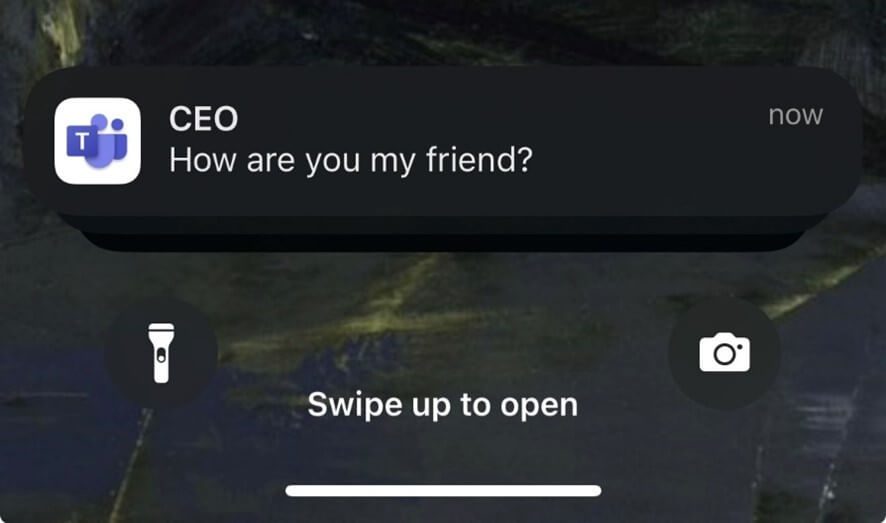
3. Spoofed Notifications
Attackers are able to manipulate notifications, making it look like they are coming from a colleague or more senior executive. In their example, Check Point shows a notification, supposedly sent from the “CEO”.
4. Forged Caller ID
In a similar vein to the previous tricks, attackers are able to alter the display name for Teams call notifications. Again, receiving this notification encourages the victim to believe the call is genuine and potentially share sensitive information.
Microsoft has released an update for Teams to fix these flaws, with no action required from users. However, Check Point explains that “these flaws strike at the heart of digital trust.
“The risks go far beyond nuisance – they enable executive impersonation, financial fraud, malware delivery, misinformation campaigns, and disruption of sensitive communications.”
In an advisory published last month, Microsoft said that: “The extensive collaboration features and global adoption of Microsoft Teams make it a high-value target for both cybercriminals and state-sponsored actors. Threat actors abuse its core capabilities – messaging (chat), calls and meetings, and video-based screen-sharing – at different points along the attack chain. This raises the stakes for defenders to proactively monitor, detect, and respond.”


