


Learn More
Fast Facts
- Company HQ: Geneva, Switzerland
- Number of Employees: 251-500 (Crunchbase)
- Ownership: Private
- Founded: 2014
Our Analysis
The email encryption market is experiencing a period of significant growth, which is being driven primarily by increasing concerns around data breaches, insider threats, and social engineering attacks. Market growth is also being driven by the need for organizations to comply with strict data protection and privacy requirements, with frameworks such as GDPR, PCI-DSS, HIPAA, SOC 2 type II, and CCPA mandating that organizations secure their communication channels.
As adoption increases, organizations face challenges with usability and user adoption. Email encryption tools often add an extra step to end users’ sending workflow, such as clicking on a plug-in, managing an encryption key, or prefixing emails with certain text (e.g., [encrypt]). Additionally, external end users may have to download specialized software or create an account to receive encrypted emails. These additional steps may deter senders from using the solution consistently, or discourage external users (e.g, partners, clients) from engaging with encrypted communications.
Proton’s Approach
Proton Mail is a secure email client that leverages end-to-end, zero-access encryption to protect emails against unauthorized viewing and monitoring. The platform addresses some of the main challenges organizations face when implementing encryption tools by placing a strong focus on ease of use. It encrypts data automatically in the background and, unlike other email encryption platforms that typically require end users to leverage a web portal and inbox plug-in, Proton Mail can be deployed as its own email client or integrated with Outlook, Thunderbird, and Apple Mail to give users the choice of their preferred interface.
Proton Mail offers a free version for consumers, which is subsidized by both Proton Mail Plus, the paid consumer version, and by Proton Mail for Business, which is a more advanced plan tailored for businesses with additional and/or advanced needs. All versions of Proton Mail offer numerous security, productivity, and quality-of-life features.
Proton Mail for Business is available standalone or as part of the Proton Business Suite, which also includes Proton Calendar, Docs, Drive, Pass, and VPN for Business. The platform has a global reach, with over 50,000 organizations using Proton for business purposes.
Market Position
Proton has carved out a niche as a pioneer and trusted leader in the privacy space. Unlike many other providers, Proton prioritizes its mission for a free and open internet over profits; the company does not sell its customers’ data, and the platform is entirely open-source and regularly undergoes independent third-party audits.
Use Cases
Proton Mail for Business includes a full suite of features designed to enhance data privacy and security:
- End-to-end email encryption: Proton Mail for Business automatically protects emails, attachments, and calendar events containing sensitive information with end-to-end, zero-access encryption, which prevents any unauthorized parties (including Proton) from viewing or harvesting sensitive information. Encrypted emails can be protected with passwords and/or expiration dates, even if being sent to external recipients, and users can request read receipts to ensure the recipient has received the communication.
- Email address obfuscation: With the “Hide-my-email” alias feature, users can obfuscate their real email address when signing up for online services. These can be deactivated at any time, lowering the likelihood of users’ real contact information being leaked by a third party.
- Dark web monitoring: The platform notifies users if their sensitive information (e.g., email address, password) has been exposed in a breach.
- Account takeover protection: Proton Mail for Business offers an anti-account takeover feature that uses a combination of human and artificial intelligence to identify suspicious activity that could indicate a user’s account has been compromised.
- User authentication: The platform supports two-factor authentication via authenticator apps and physical security keys.
Proton Mail for Business’ secure collaboration and productivity features help save end users’ time and minimize mistakes within email communications:
- Custom domains: Admins can set up the use of company branding and custom domains, and end users can choose to use shorthand domains (@pm.me) on their Proton email addresses for ease of use.
- Email deliverability assurance: Admins can set a “catch-all” email address that enables the organization to receive mail addressed to their domain, even if the sender has misspelled the recipient’s email address.
- AI-assisted email composition: The platform’s Proton Scribe feature (included within Duo, Family, Visionary, and Lifetime plans and available as an add-on for other plans) can write emails based on a natural language prompt, proofread emails, and adjust messages for length and tone. Scribe can either be run on Proton’s servers (prompts are never logged or used for training) or locally on users’ own devices.
- Scheduling assistance: End users can schedule emails to send at a specific time or delay sending by up to 20 seconds for an opportunity to undo. Users can also “snooze” emails, temporarily removing the messages from their inbox and notifying them at a more convenient time.
- Automated inbox organization: Proton Mail for Business automatically moves email newsletters and subscriptions to their own folder, reducing noise and clutter in users’ inboxes. Users can also automatically unsubscribe from unwanted subscriptions, automatically delete spam and trash after 30 days, and set up custom filters to automatically perform actions such as moving, marking, or auto-replying to messages.
- Integrated calendar: Users can create calendars for different teams, projects, or events, and share them with colleagues to check availability quickly and easily.
Proton Mail for Business is designed to improve not only the end users’ experience, but also the admin experience:
- Centralized user management: Admins can easily add, remove, or update users from within the central management portal. This includes setting up group email addresses and team distribution lists.
- Compliance and auditing: The platform is ISO/IEC 27001 certified, SOC 2 type II audited, and helps organizations comply with frameworks such as GDPR, PCI-DSS, HIPAA, and CCPA.
The Interface
Proton Mail for Business can be accessed through the web, on desktop (macOS, Windows, Linux), and on mobile (iOS, Android). End users can choose to use Proton Mail’s own interface or integrate the email client with Outlook, Thunderbird, or Apple Mail as preferred.
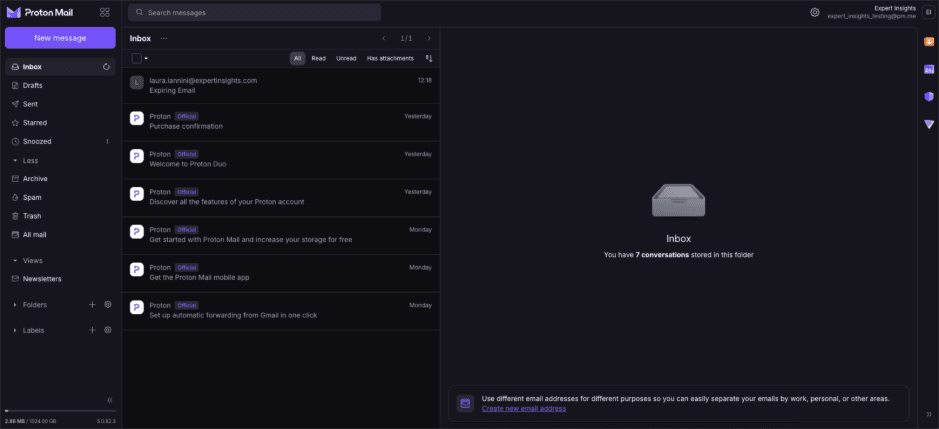
Proton Mail’s own interface is modern and easy to navigate from both an end user and administrative perspective. It’s easy to set up passwords or expiration dates for sensitive communications from within the inbox, as well as to set up Proton Scribe’s email drafting and proofreading functionality.
It’s also very easy for external recipients to open and read password-protected emails: the user receives an email with a link to view the encrypted message, which opens the Proton portal. Within that portal, the user is prompted to enter the password, then shown the email’s contents and any expiry information.
Strengths
- Easy onboarding: Thanks to the platform’s “Easy Switch” feature, it’s very easy for users to import their existing email addresses, messages, and contacts into Proton Mail. If users prefer the experience of another desktop email client, they can integrate Proton with Outlook, Thunderbird, or Apple Mail using the platform’s “Proton Mail Bridge” feature. Admins can also integrate Proton Mail with their business applications through automated forwarding and SMTP submission.
- Highly granular and configurable: Proton Mail for Business gives organizations granular control over end users’ storage, permissions, and settings. Plus, end users can control how their inbox is organized, making it easier to access the messages that are most important to them.
- Privacy is the top priority: Every service in Proton’s suite is open source and audited by independent third parties. All messages are end-to-end encrypted, and Proton does not sell its customers’ data.
Cautions
- Potential for account lockout: When an end user creates a new account, Proton generates a recovery phrase and/or file for them to keep safe. If the user loses their Proton Mail password without having saved this recovery information or set up an alternative recovery method, they may end up locked out of their account. This can be mitigated by advising that end users keep their recovery data safe, set up a recovery email address/phone number, and designate an emergency contact for their Proton Mail account.
- Lots of email notifications: Proton sends quite a few welcome/getting started emails when you first sign up. The information in these messages can be helpful, but some users may not want email notifications from Proton. For those users, any promotional/notification emails from Proton can be toggled on and off in the account settings under “Dashboard”.
Summary
Proton Mail for Business is a feature-packed, yet very user-friendly email security service. The platform’s strong focus on usability (e.g., encrypting data automatically in the background, integrating AI-driven productivity tools, and the highly customizable interface) makes it a strong choice for organizations of all sizes.
Its comprehensive range of data protection and privacy features makes Proton Mail for Business particularly suitable for any organization that handles sensitive information or is likely to be a high-value target for threat actors, such as legal and consulting services looking to protect confidential client information, development teams looking to secure project-related communications, and healthcare organizations looking to meet HIPAA compliance requirements for patient data privacy.


