


Expert Insights Verdict
We’ve reviewed Keeper’s enterprise functionality over the course of a 14-day trial, testing the password manager, browser isolation, and secret management capabilities. Keeper Security earns a 5/5 rating as one of the most secure and feature-rich password managers available. Keeper excels in usability, advanced security measures, and developer-friendly integrations, making it particularly valuable for mid-sized to large organizations and software teams handling sensitive infrastructure credentials. While the add-on model may push up costs, the depth of features on offer can offset the additional cost by consolidating multiple security tools into one platform. For businesses prioritizing robust password protection, compliance, and centralized secrets management, Keeper is a strong choice to consider.
Strengths
Cautions
Learn More
Overview
Keeper Security is a popular enterprise password manager. With Keeper, users can store all their passwords and 2FA authenticator codes in one secure vault. Admins can also create and enforce secure password policies.
Keeper is designed to prevent password-related data compromise and password threats. Keeper offers one of the most secure password managers on the market. It’s packed with additional features like privileged access management, browser isolation, and secrets management.
Keeper is a market leader in the password manager space, it supports 70,000 business customers and 4 million users globally.
But is Keeper right for your business? With tough competition in the space, finding the best business password manager isn’t easy.
In this review, we’ll outline our experience with Keeper over our 14-day trial period. We’ll start with the certifications and security policies. Then we’ll look at initial setup before taking a look at each of the key features of the service in turn.
Initial Setup
Getting up and running with Keeper is straightforward. You simply create an admin account and generate a master password. You are also given a recovery phrase so you can get back into your account if you ever forget the master password.
You can then easily invite new users to the Keeper platform, configure security policies like master password complexity.
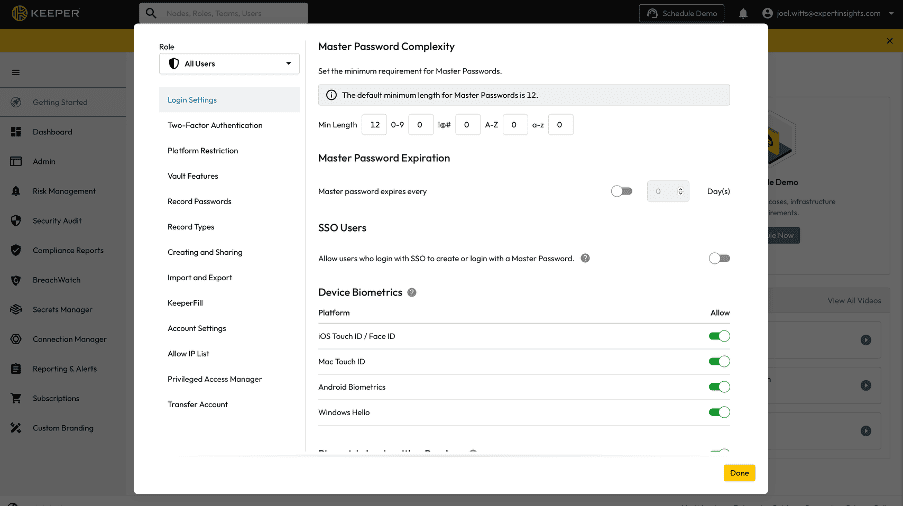
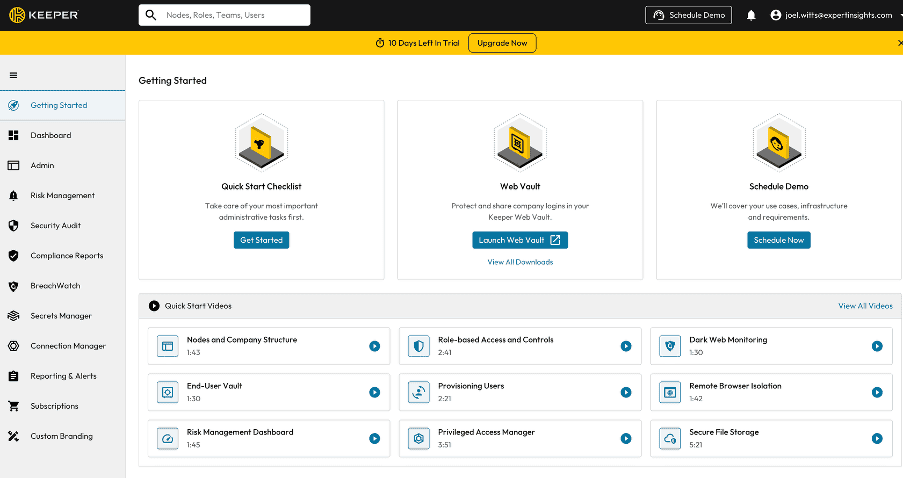
The documentation is helpful: there is a quick start guide to take you through the deployment process, multiple video overviews of important modules to get started, and comprehensive written documentation if you prefer.
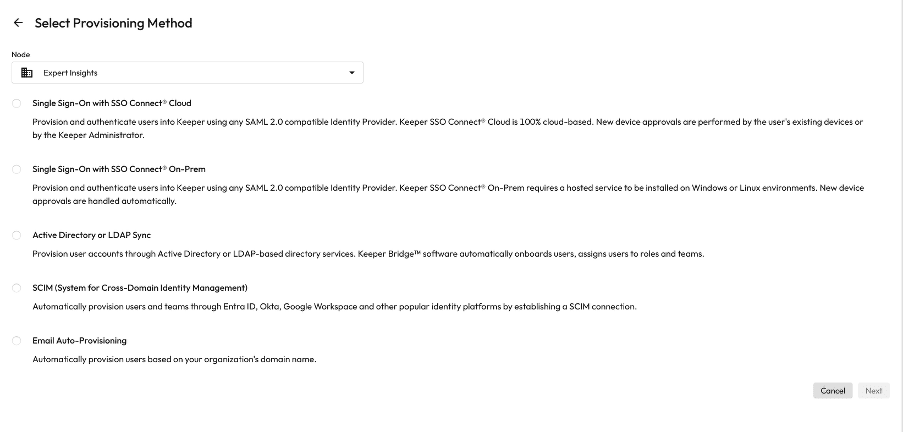
Adding users is fast and scalable for most teams. There are multiple options of automated provisioning of accounts, including via Active Directory, Single Sign-On (SSO) and email auto-provisioning.
Keeper organizes users in a clear structure that scales well for enterprises. Admins can group accounts into “Nodes”, subdivide them into “Teams”, and assign different roles with granular permissions.
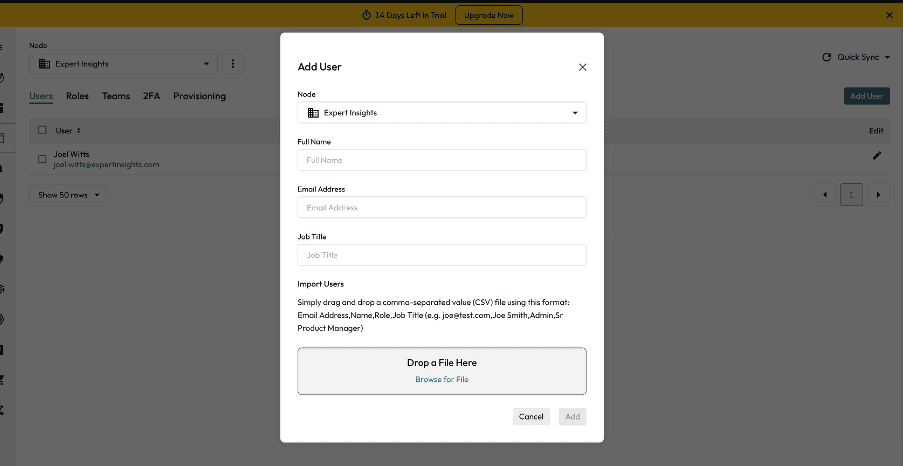
The whole process is smooth, modern, and user-friendly. It all takes place in the web app; there’s no need to download an app or install a client.
When end users are enrolled, they will receive an email with a link to sign into their account. After they create their master password, they can start importing their passwords and using the browser plugin to login to accounts. We’ll cover the end-user vault in more depth more later in this review.
Compatibility
Keeper ticks all of our boxes for compatibility. It works across all desktops, laptops, and tablets and the vault syncs in real-time across devices for end-users. Keeper can also be accessed offline if required.
Keeper’s admin console is accessible via any web browser, you don’t need to install a client or app. The end-user password vault is available on all smartphones, tablets, and computers. A browser plugin is available for all popular browsers, including Chrome, Safari, Edge, and Opera.
There is also a smartphone app available for mobile devices. This is available for iOS, Google Play, and Microsoft Store.
A full breakdown of compatibility can be read here.
Platform Security & Certifications
Platform security is one of the top considerations when choosing a password manager. While this is hard for us to put to the test outright, Keeper does have an industry reputation for being a very secure password manager. Keeper is one of the few solutions on the market that has never suffered a breach of end user credentials.
Keeper is built on a zero-knowledge architecture. All encryption and decryption of the passwords stored in the end-users’ vault takes place on the users’ device itself, rather than the Keeper platform.
Keeper cannot see, access, or recover any user data. This means even if Keeper is compromised, your password data is always secure.
The password vault is encrypted using AES-256 encryption. Key derivation is handled by PBKDF2 and Elliptic Curve Cryptography (ECC), which stops brute force and credential stuffing attacks.
Keeper supports Multi-Factor Authentication (MFA), Single Sign-On (SSO), conditional access policies (more on these later), FIDO2 passwordless authentication via hardware keys, passkeys and biometric logins via Touch ID, Face ID, and Windows Hello.
Keeper is also regularly penetration-tested by independent third parties and undergoes continuous vulnerability scanning. Security updates are rolled out frequently, and all code changes are subject to review.
Keeper maintains a broad set of industry certifications, including:
- SOC 2 Type 2 and ISO 27001 certification
- FedRAMP Authorization for U.S. government use
- HIPAA and GDPR compliance for healthcare and data protection requirements
- StateRAMP and CSA STAR certifications
You can read about Keeper’s security model here.
Importing Passwords
Before we get into the password vault itself, a quick note about importing passwords.
Importing passwords into Keeper is fairly straightforward, but the method depends on whether you’re coming from a browser or another password manager.
Keeper integrates with Active Directory, SCIM, and SSO providers to provision accounts and import credentials in bulk.
Admins can push shared folders or predefined credentials directly into user vaults.
As an individual, if you are coming from another password manager you can import your existing vault as a CSV. This isn’t really the most secure method as it does create an unencrypted file of all your passwords, but it is quick. Once you’re done, you can just delete the CSV.
Password Manager Vault
Keeper’s secure password vault is the central repository for end users to access all their saved passwords, secrets, and records.
From here, you can easily add new records, which can be anything from a password, to a file, to a payment card.

When adding a password manually, you simply choose the name of the record, enter your email, and then generate a secure password.
You can choose how secure the password is by configuring the length, character types, and more. You can also write in your own password or paste in a password from elsewhere.

Another neat feature with Keeper is that you can attach files, photos, and videos, add custom fields and even add self-destruct modules.
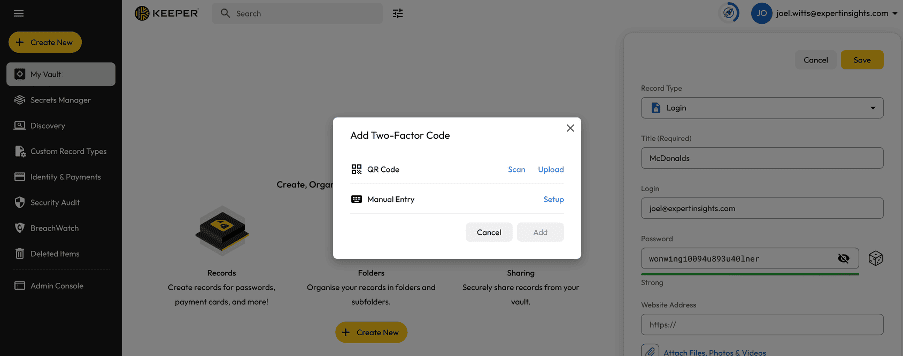
When you need to grab a password, you can simply search for the record by title or email address and copy the password.

You can store your two-factor authenticator codes in Keeper, which is very helpful and makes it much faster to log into your stored accounts when using the browser extension.

Warnings are displayed on weak or reused passwords. Keeper also displays warnings if a password and email address combination have appeared in a known data breach as part of its dark web monitoring capabilities.
Records can be sorted into folders. These folders can be shared with specific individuals and teams where required.
Security Scores

The end-user dashboard gives you a security score and provides some helpful suggestions about improving password security.
My Experience
In my testing I found the password vault to be easy to use and navigate. You can sort by list and card view, search by record keyword, and filter by multiple different characteristics. You can also add passwords as favorites which mean they’re easily accessible.
There are likely more features than most end users would typically use, which you could say adds complexity. For example, most users may not need to store files and attachments. But it is good to have the option, if the need does arise at some point.
One of the common questions with password managers is around where you would store your master password. Keeper supports Passkeys (passwordless authentication that leverages your browser and device biometrics) and hardware authenticators.
The Admin Console
From the admin console, you can manage all users, privileges, and security policies. You can see at a glance all of the add on features you have enabled, e.g. BreachWatch and Keeper Connection Manager, which will be covered in more detail shortly.
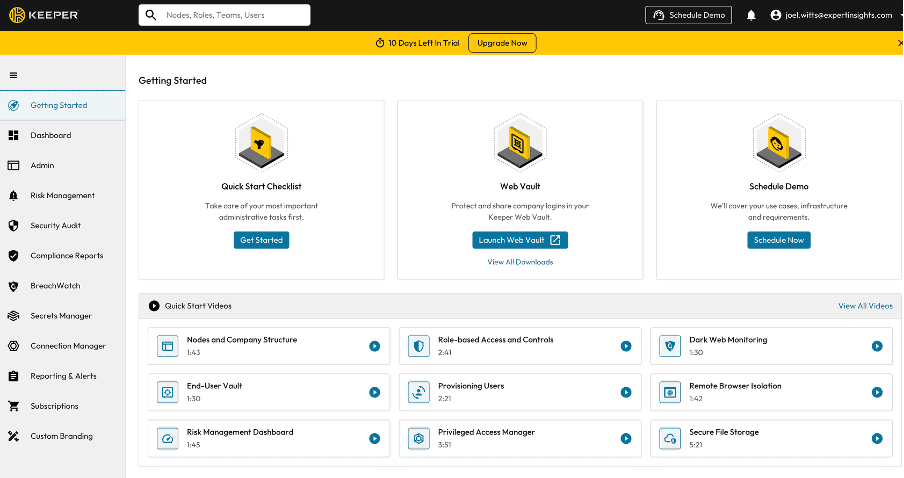
You can view in-depth reporting and alerts, manage your subscription and even setup custom branding for the service if required. There’s also a nifty search tool for finding what you are looking for quickly – something I haven’t seen on other password manager consoles.
The console is fast, responsive, and very easy-to-use whatever your level of technical expertise and know-how.
Now we’ve covered the setup, vault and admin console, let’s take a look at some of the key features in turn.
Browser Plugin (KeeperFill)
Keeper’s browser plugin is how most users will interact with the platform on a regular basis. As you browse the web, it automatically detects password input fields and pastes your passwords and 2FA codes directly from your password vault, instantly logging you into apps.

Keeper has named this feature KeeperFill.
When logging into an account the service should pop up with your password automatically and autofill this into the password box.
This works seamlessly most of the time, but if for whatever reason it doesn’t match up, you can open the browser extension and grab the right password without having to leave the page.
This works by simply copying the password so you can paste it into the relevant box. Admins or end users can configure a set time for these passwords to expire from your clipboard, which is a neat feature to put a stop to clipboard stealer malware.
Password Import
Another important use case of the browser extension is importing already saved passwords into the vault to be securely stored.
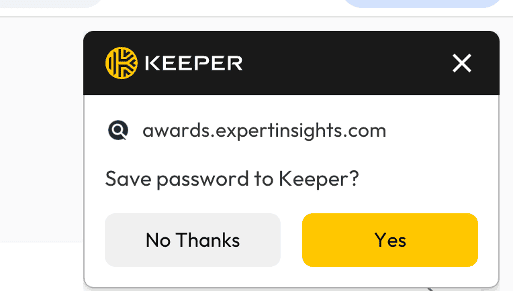
This is very simple – you simply log into an account, and you’ll get a pop up asking if you want to save the password to the Keeper vault.
If you’re creating a totally new account, you can add the record when you are creating your password.

This opens out into a new tab where you can enter a record name, the login, password, and more.
Dark Web Monitoring (BreachWatch)
Keeper’s BreachWatch feature provides continuous dark web monitoring to detect if your passwords or credentials appear in breaches published on the dark web.
This is a paid add-on to the main Keeper service.
Both admins and end users can view these reports within the admin console and password vault respectively. You will also receive alerts via email and in the admin console if a compromised password is detected.

This encourages users to change their credentials quickly if a breach takes place, hopefully preventing malicious actors from being able to break into accounts.
As an admin, you can view BreachWatch alerts for all enrolled users. You cannot view end user passwords or force them to change the password, but you can lock the account or transfer the passwords to another user if required.
Is it worth adding this module? It’s a great extra layer of security for those that need it. However, at $20 per user per year, it could be an expensive add-on for a bigger team.
Secrets Management (Keeper Secrets Manager)
Alongside the core password manger functionality, Keeper offers a developer focused secrets manager. Keeper Secrets Manager provides a secure vault for engineers to manage all their credential’ infrastructure secrets, SSH keys, API keys and certificates with SDKs and CI/CD integration.
Keeper Secrets Manager is a fully managed, cloud-based service with no agents, proxies, or on-premises servers required. This makes deployment straightforward, with no additional infrastructure to maintain or VPC peering to configure.
The secrets manager sits within the same vault as the password manager, so all credentials can be managed from a single platform.
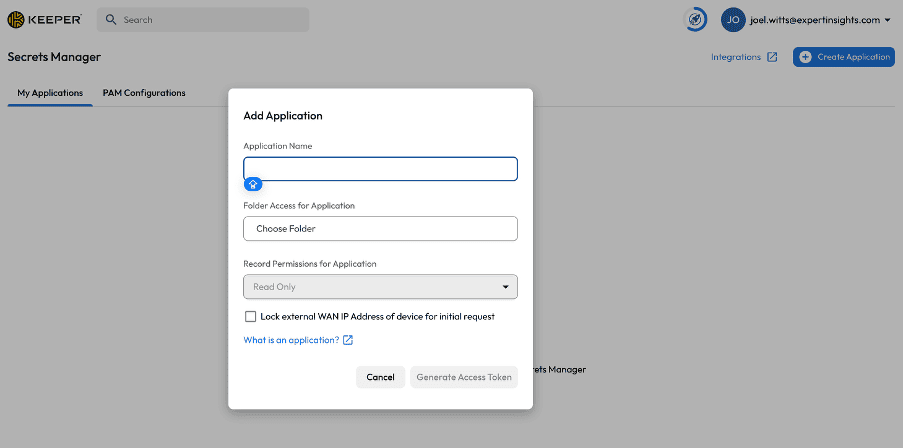
The platform is designed to eliminate the risk of credentials being exposed in Git repositories, CI/CD pipelines, or log files, which remain one of the most common causes of breaches.
Within the vault, admins can rotate secrets, pull detailed audit logs for API requests, and enforce granular, role-based policies to support least-privilege access. Developers can securely retrieve secrets at runtime using Keeper’s SDKs, CLI, or RESTful API without ever hardcoding them into configuration files.
Keeper Secrets Manager integrates natively with popular DevOps tools such as GitHub Actions, Jenkins, Terraform, Kubernetes, and Docker, helping teams streamline secret injection during builds and deployments.
It also supports multi-cloud and hybrid environments, running seamlessly across AWS, Azure, Google Cloud, and on-prem infrastructure with multi-region availability and compliance support for global teams.
A full list of integrations is available here.
Importantly, Keeper applies the same rigor to non-human identities as it does to end users, protecting the secrets that scripts, services, and microservices rely on for machine-to-machine authentication.
While secrets management itself is not unique to Keeper, the advantage here is that it is unified within the same account and admin console as the core password manager.
This allows organizations to apply consistent oversight, auditing, and policy enforcement across both user and machine credentials, without managing separate systems.
Keeper Secrets Management is a paid add on to the base password manager. It’s included in Keeper’s Privileged Access Management option, which starts at $85/user/month.
Privileged Access Management
In February 2025, Keeper launched KeeperPAM, a cloud-native privileged access feature that sits in the same admin console and on the same zero-knowledge architecture as the password manager.
The goal with KeeperPAM is to give admins more tools to secure accounts with elevated privileges. This means implementing least privilege policies (ensuring only users who absolutely need access have access to privileged accounts) and session management to monitor and record who is accessing these sessions.
Instead of deploying multiple products or relying on legacy on-prem appliances, KeeperPAM runs from a lightweight gateway that removes the need for agents, VPNs, or firewall changes, and ties access directly into the user vault.
The experience is straightforward: once authenticated through MFA, users can launch instant passwordless sessions into servers, databases, web apps, or SaaS platforms.
Keeper never has access to the underlying systems, since all traffic and session data is encrypted end-to-end under a strict zero-knowledge model.
A top feature of KeeperPAM is remote browser isolation. Rather than exposing credentials or opening direct connections, users launch a protected browser session embedded directly inside the Keeper Vault.
These sessions are projected visually from the Gateway, so the end user never interacts with the target system directly. We’ll touch on remote browser isolation more in the next section.
Admins have oversight into privilege account activity through logs, session recording and auditing that can be exported to SIEMs for compliance. Support for multiple protocols is broad out of the box, covering SSH, RDP, VNC, MySQL, PostgreSQL, SQL Server and HTTPS, with both CLI and GUI access options.
Remote browser isolation is also built into the PAM layer, so administrators can lock down internal web applications and admin panels without exposing credentials to the endpoint.
A core component of KeeperPAM is session management, which allows secure, web-based access to sensitive systems without sharing passwords or exposing credentials.
Administrators can grant access to servers, applications, containers, and databases with granular control, specifying exactly what resources a user can access — whether a full system, a containerized environment, an application, or a database instance.
Sessions can be initiated via SSH, RDP, VNC, Kubernetes terminals, or database clients such as MySQL, PostgreSQL, and SQL Server. All sessions are fully recorded and auditable, providing detailed visibility for compliance frameworks like PCI DSS, SOX, HIPAA, GLBA, FISM, and GDPR.
Discovery is another integral part of KeeperPAM, providing organizations with complete visibility into their privileged accounts and IT assets. Through the Keeper Gateway, Keeper Discovery scans on-premises environments and cloud platforms such as AWS and Azure, automatically identifying machines, databases, user accounts, and services.
The findings are processed through a rules engine to create Keeper records that can be added to shared folders, enabling administrators to quickly associate credentials, apply access policies, and audit usage.

Database management is tightly integrated within KeeperPAM. Credentials for database accounts are stored securely in the Keeper Vault, and access is brokered through the Keeper Connection Manager.
This ensures that users can run queries or administer databases without ever seeing the underlying credentials, while all activity is recorded for auditing. Access policies can enforce least privilege and session limits, reducing the risk of misuse or insider threats.
Remote Browser Isolation (Keeper Connection Manager)
Keeper Connection Manager extends the Keeper platform beyond password and secrets management into secure, VPN-free access to web applications.

Keeper Connection Manager (KCM) is a remote desktop gateway that provides DevOps and IT teams with, Zero-Trust Network Access (ZTNA) to RDP, SSH, databases, internal web applications and Kubernetes endpoints through a web browser.
This works via Remote Browser Isolation (RBI), a feature that allows users to access internal and cloud-based websites through a protected browser projected from a Keeper-hosted container.
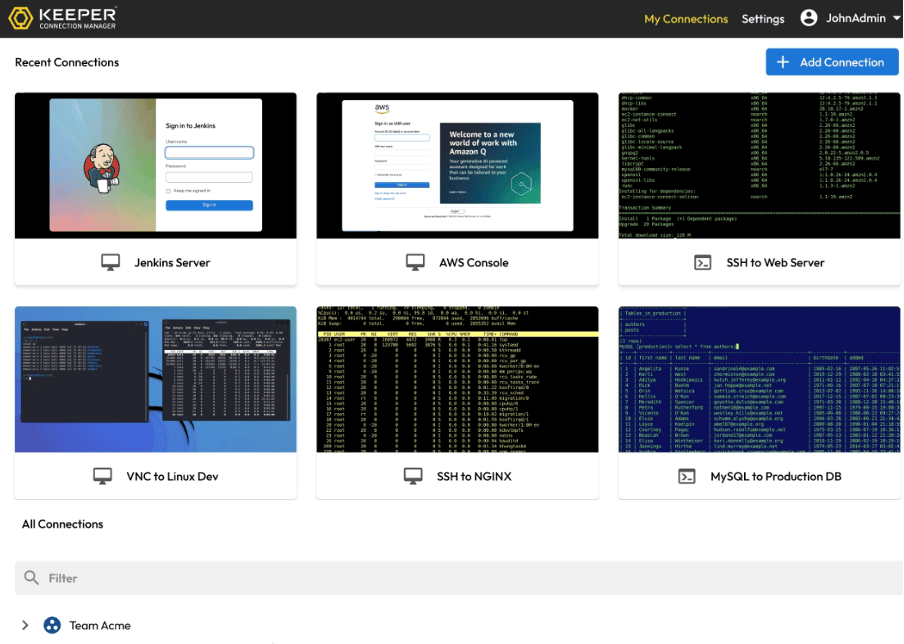
Keeper’s remote browser isolation feature can automatically inject passwords, submit forms, and control the target web application without ever sending the credentials to the user’s device.
The benefit of this approach is that it secures access to internal tools and applications, addressing a gap with traditional VPN solutions. It also provides detailed session logs and activity records.
Instead of opening a direct session on the endpoint device, all browsing activity runs within a virtualized Chromium instance that streams securely through the Keeper Vault. This approach eliminates the risk of credential theft, DOM inspection, cross-site scripting, or device compromise, since sensitive data never leaves the isolated session.
From an admin perspective, Keeper’s RBI offers granular control and monitoring. Access can be restricted to a defined set of URLs or domains, actions like file uploads, downloads, or clipboard use can be disabled, and all activity can be recorded for compliance and auditing.
For end users, the process is very easy. End-users can simply launch browser isolation sessions directly from their Keeper Vault. Teams can use it for testing and quality assurance, test suspicious links and even to co-browse by sharing an active window with a colleague, which can be helpful for training.
Security Policies
Keeper’s security policies provide granular control over access and usage across all managed resources.
Admins can implement least privilege principles, enforce automated credential rotation for passwords and secrets, and require MFA for sensitive actions.
These configurable policies reduce attack surfaces, mitigate insider threats, and help you to maintain consistent compliance policies.
Reporting and Alerts
Keeper offers comprehensive reporting and alerting to provide visibility into user activity, privileged sessions, and overall security posture.
The platform shows an event timeline, tracking over 200+ event types mapped over time, such as failed logins and admin changes. Reports can be customized and filtered as required.

You can also configure and customize real-time alerts sent via email or even SMS texts to notify you if an account is compromised or accessed, for example. You can configure alerts for unusual behavior, policy violations, or critical access attempts.
The platform integrates with 3rd party SIEM tools like Splunk and Sumo Logic for more in-depth analysis.

You can also build reports around compliance frameworks like PCI DSS, HIPAA, SOX, GLBA, and GDPR.
Reporting is comprehensive and easy to setup and manage within the admin dashboard, without major ongoing maintenance required. However, it is important to note some of the advanced reporting and analytics features are only available with the Advanced Reporting And Alerts add-on module.
Pricing
Keeper’s base pricing is cheaper than other password manager services, but when totaling up all of the available add-ons, Keeper can be an expensive choice for enterprise password management.
However, the tradeoff of more robust security controls, the depth of features covered, and the cost saved by investing in Keeper vs multiple point solutions (especially in the PAM space) will offset the Keeper costs.
Keeper Pricing Explained
Pricing information taken in September 2025.
| Plan / Component | Price (Per User / Seat) | What’s Included | Notes |
| Business Starter Password Manager | US$ 2/user/ month (annual) | Core password vault, password sharing, team folders, basic admin console, 2FA, basic policy controls | Entry-level plan; lacks SSO, SCIM, advanced reporting |
| Business Password Manager | US $3.75/ user / month (annual) | Everything in Starter plus delegated admin, advanced team management, policy enforcement | Good for SMBs; still missing some enterprise integrations |
| Enterprise Password Manager | US $5.00 / user / month (annual) | Includes SSO (SAML 2.0), SCIM provisioning, AD/LDAP sync, advanced MFA integrations, compliance reporting | Best fit for large organizations with complex environments |
| KeeperPAM (Privileged Access Management) | US $85.00 / user / month (annual) | Privileged session management, remote browser isolation, password rotation, connection manager | Add-on to Business or Enterprise plan |
Add-Ons
| Add-On | Price | Features | Notes |
| Secrets Manager | Quote-based | SDK, CLI, REST API for managing API keys, certificates, SSH keys, CI/CD integrations | DevOps-focused; scales across multi-cloud environments |
| Remote Browser Isolation | Included with PAM, or as add-on | Secure web sessions, session recording, autofill credentials without exposing them, URL allow-lists | Removes need for VPN; isolates sessions at the browser level |
| Advanced Reporting & Alerts | Quote-based | Centralized logging, SIEM integration, compliance dashboards, audit trails | Useful for regulated industries (HIPAA, GDPR, etc.) |
| BreachWatch (Dark Web Monitoring) | Extra fee per user | Monitors user credentials against known breaches and exposures | Helps with proactive password threat detection |
| Secure File Storage | Extra fee per GB / per user | Encrypted file storage tied to the vault | Useful for sensitive docs, certificates, or configs |
| Connection Manager | Included with PAM | Zero-trust, agentless access to RDP, SSH, MySQL, VNC, Kubernetes endpoints | Self-hosted via Docker/Linux binaries |
A full pricing breakdown is available from Keeper here.
Summary
Keeper Security is a leading enterprise password and secrets management platform with a strong focus on security, scalability, and ease of use.
Admins benefit from a user-friendly console, smooth onboarding, and granular security policies, while end users gain access to a secure, intuitive password vault with 2FA integration, autofill, and dark web monitoring.
Keeper extends beyond passwords with Secrets Manager for DevOps, Privileged Access Management (KeeperPAM) for privileged accounts and session security, and Connection Manager for VPN-free remote access.
Compatibility is broad, with apps for all major platforms, browsers, and mobile devices. The platform offers excellent documentation and a smooth setup process. The only significant drawback is pricing: while base plans are affordable, enterprise features and add-ons (such as PAM, BreachWatch, and advanced reporting) can quickly make it expensive for larger teams.
Overall, we recommend Keeper as a top-notch password manager with some of the highest security standards and range of features available on the market.


