

Strengths
Cautions
Learn More
Expert Insights Verdict
Cayosoft Administrator consolidates administration of on-premises Active Directory, Entra ID, Microsoft 365, Exchange, Teams and Intune into a single delegated platform. It operationalizes policy for Microsoft identity work rather than defining enterprise governance policy: user onboarding/offboarding automation, group lifecycle management, help desk delegation, and Microsoft 365 license optimization. Cayosoft was founded in 2013 by the team that pioneered Active Directory management 14 years prior, and Administrator is squarely aimed at organizations that have outgrown native tooling or find that legacy on-premises tools do not extend cleanly into hybrid.
Cayosoft Administrator’s primary differentiator is task-based delegated administration. Administrators are granted task-scoped rights inside Cayosoft rather than through native Active Directory or Entra ID permissions, so an operator can perform privileged work while holding no standing privilege in either directory. Cayosoft pairs this with just-in-time elevation for on-premises Active Directory through time-bound, approval-gated restricted group membership. On-premises AD lacks an equivalently integrated PIM experience; Microsoft’s first-party PAM and TTL-membership alternatives require considerably more infrastructure and configuration.
Fast Facts
- Headquarters: Columbus, Ohio, United States
- Founded: 2013
- Ownership: Private
- Funding: $22.5m minority growth investment from Centana Growth Partners (company announcement, March 2024)
- Employees: 88 (vendor-provided, August 2026)
- Scale: More than 5 million managed users worldwide (company-reported)
- Security and compliance: SOC 2, CMMC Level 1, CISA Secure by Design. Member of the Microsoft Intelligent Security Association
- Version reviewed: Cayosoft Administrator 13.1.1
Why Would You Use Cayosoft Administrator?
Creating a single user in a hybrid Microsoft environment is not a single operation. The account needs to exist in Active Directory with the correct attributes, be linked to the corresponding Entra ID identity, hold a mailbox, carry the right licenses, and sit in the right groups. Handled natively, that sequence crosses several consoles and usually ends in PowerShell. Handled through Administrator, it is one declarative rule fed from an HR system, and the same rule runs in reverse when the person leaves.
The second problem Administrator addresses is delegation. Native Active Directory delegation is coarse, and in practice organizations resolve that in one of two unsatisfactory ways: senior engineers keep doing routine work, or first-line staff are granted rights well beyond the tasks they actually perform. Administrator inverts the model. Rights are defined as tasks within Cayosoft and scoped to a virtual admin unit, and the operator holds nothing in the directory itself. Where the platform is configured this way, a compromised help desk account yields read access rather than the ability to modify directory objects.
The third is cost. Microsoft 365 licenses accumulate against departed users and against staff who no longer need the tier they hold. Administrator reports assigned against used licenses, applies quotas and reclamation policies, and can be pointed at negotiated pricing rather than Microsoft list, so the savings figure reflects what the organization actually pays. Cayosoft reports that some customers buy the platform for this module alone.
Market Position
Cayosoft competes in hybrid Active Directory management and delegated administration, most directly against One Identity’s Quest ActiveRoles, Softerra Adaxes and ManageEngine ADManager Plus, and against native Microsoft tooling. Its stated differentiation is that it was built for hybrid from the outset rather than extended into it, and the company describes itself as having been created by the core team behind Quest’s management platforms.
Named customers include the Internal Revenue Service, the State of New Mexico, the Auto Club Group (AAA), Broward Health, Citrus Health Network, Department of Defense and WinnCompanies, with a pronounced public sector and healthcare weighting and a US federal and state route to market through Carahsoft. Cayosoft’s sales materials count nine Gartner reports over the twelve months to mid-2026 naming it as a representative vendor, spanning ITDR, Microsoft 365 governance, SaaS backup, Active Directory management, and AI agent action rollback, and AI governance; the underlying reports are subscription-only and we have not verified each mention. The company also reports a customer retention rate of 99% over three years.
Administrator’s relationship to identity governance is central to how Cayosoft positions the product. The company describes governance platforms such as SailPoint, Saviynt and Okta as setting policy while Active Directory and Entra ID carry out the work, and places Administrator in what it calls the last mile between the two. Cayosoft’s pitch deck puts the cost of building a single native connector from a governance platform into the Microsoft estate at $150,000, with $50,000 a year to maintain it and three to six months to build; these are vendor estimates rather than sourced market figures.
While Cayosoft did not characterize the split between customers running Administrator beneath a governance platform and customers running it in place of one, the company highlighted strong demand from the IT teams that run the enterprise directory rather than through formal IGA initiatives. The company also points to the replacement of PowerShell scripts and homegrown identity tools as a recurring purchase catalyst, with customers citing unmaintained bespoke provisioning code as the trigger. HR integration follows one of two patterns: Administrator consumes the HR feed directly, or the governance platform creates the initial account and Administrator carries out the Microsoft-specific work, including groups, Teams, Teams telephony and license assignment.
Migration from legacy Active Directory management and governance solutions such as Quest Software and One Identity represents a meaningful part of Cayosoft’s business, with the IRS and a US Department of Defense agency (delivered with partner XMS Solutions) as public references. Migration from ActiveRoles is partially automated through scripts and migration tooling, with the remainder delivered through customer effort and implementation partner services. Existing ActiveRoles policies and workflows are not imported wholesale, so organizations with heavy customization should scope the rebuild into the project.
Use Cases
Hybrid Identity Lifecycle Automation
Administrator provisions and deprovisions users across on-premises Active Directory, Entra ID and Microsoft 365 from an authoritative source, with Workday, SQL, Oracle, API, and flat file connectors available. A single rule creates the account, sets attributes, assigns the mailbox and licenses, and applies group membership, with the on-premises and cloud objects correctly associated. The same machinery handles movers, and on departure disables the account, strips group membership, reclaims licenses, converts the mailbox and moves the object to a quarantine container. Citrus Health Network reports that account creation fell from around two hours to five minutes and that junior staff now perform work that previously required senior engineers.
Delegated Administration Without Standing Privilege
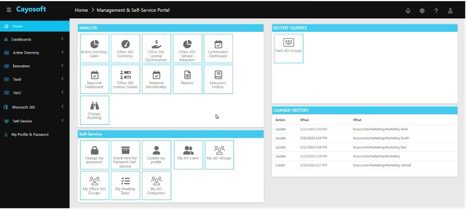
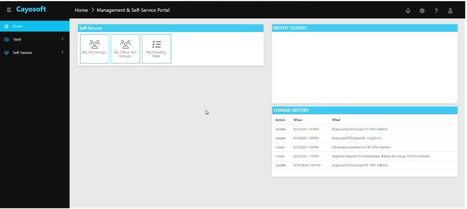
Rights are defined as discrete tasks and assigned through role-based and attribute-based rules, scoped to virtual admin units that need not correspond to the directory’s own structure. In the review environment, an administrative account and a help desk account signing into the same console were presented with entirely different capability sets, with the help desk account able to reset passwords, add users to groups and view its own change history, and nothing else. Approval workflows can be layered on top, and requests can be made to require a ticket reference before submission.
Where operators hold no standing rights, the platform necessarily does, and Cayosoft is direct about what that means. In its written response for this report, the company confirmed that Administrator is a tier-0 platform operating with delegated write permissions in both directories, that the Active Directory account typically carries Domain Admin-level permissions, and that Entra ID access runs through a service principal with Graph API permissions scoped to the services the customer configures. Cayosoft provides hardening guidance covering the platform and its privileged accounts, including monitoring and alerting.
Group Lifecycle and Just-in-Time Access
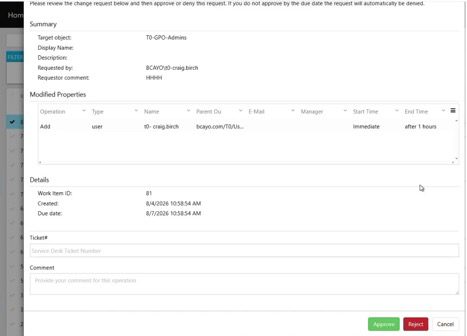
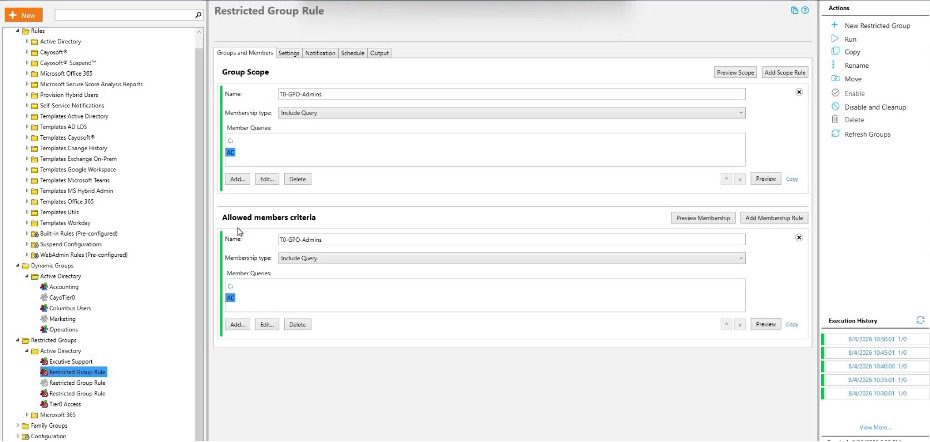
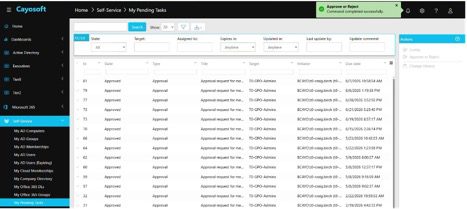
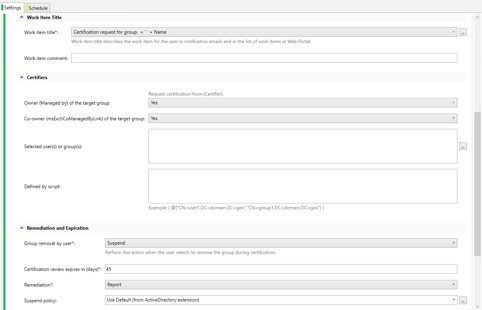
Dynamic group membership is driven from directory or HR attributes, which addresses the common failure where users accumulate group membership on promotion and never lose it on transfer. Cayosoft applies this to on-premises Active Directory groups as well as Entra ID and Microsoft 365 groups, distribution lists and Teams. Restricted groups provide the just-in-time path for privileged on-premises groups. In the demonstration, a request to add a member to a tier-0 group required a ticket reference, could not be self-approved, and generated an approval task for the group’s approver, with membership granted for a bounded period on approval. Group certification and attestation workflows are delegated to group owners rather than run by IT. Expiry appeared to run as a scheduled operation on a five-minute cycle in the review environment; Cayosoft has since confirmed that expired membership is removed at expiration.
Microsoft 365 License Optimization
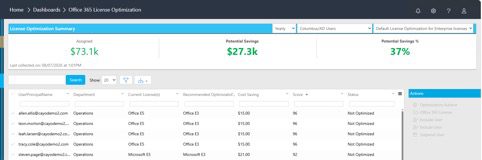
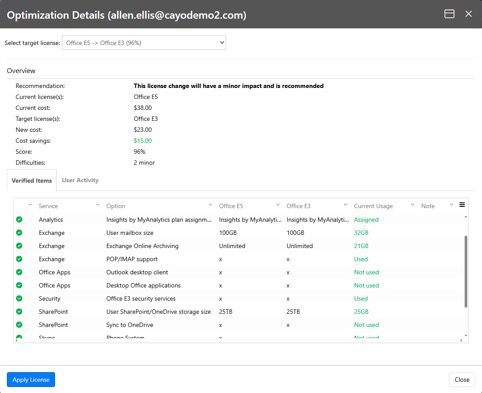
The licensing dashboards report total, assigned and remaining licenses by SKU, alongside cost estimates broken out by assigned, hybrid assigned, unassigned, hybrid inactive, shared mailbox and recycle bin users. A separate optimization dashboard scores users against their current licenses and recommends downgrades or reclamation, with actions to exclude or include individual users and to suspend accounts. Costs are entered by the customer, so output reflects negotiated rather than list pricing. Cayosoft also offers license quotas and an advisor function for ongoing assignment control.
The Interface
Administrator delineates the interface between configuration and setup and day-to-day hybrid administration. The distinction matters when planning who works where. Configuration and setup happen in a Windows desktop console, organized as a tree covering rules, dynamic groups, restricted groups, family groups, configuration, Microsoft 365 licensing, and reference lists and data. Prebuilt template sets are supplied for Active Directory, Office 365, Exchange on-premises, Microsoft Teams, AD LDS, Workday and Google Workspace.
Each rule object carries its own execution history and a save-and-discard model, and rules can be previewed before they are run. In practice a small number of engineers work here and everyone else works in the portal, a reasonable division of labor, though it means the platform’s configuration surface is a thick client with its own upgrade and access considerations, and buyers should note that the single-console story applies to day-to-day administration rather than configuration.
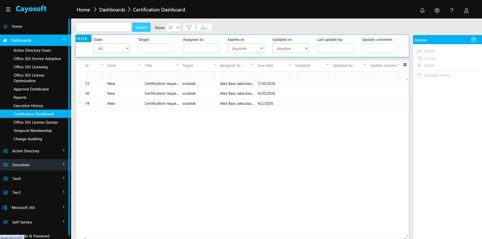
Day-to-day management of hybrid Active Directory takes place in the web portal. The landing page is a tile-based console split into analysis functions and self-service functions, with panels for recent queries and for a running change history showing action, timestamp and the object affected. Navigation is organized by dashboards, directory scope and self-service, with customer-defined admin units appearing as their own navigation entries; the review environment carried Executives, Tier0 and Tier2. Dashboards cover Active Directory and Entra ID users, Microsoft 365 service adoption, licensing, license optimization, approvals, reports, execution history, certification, license quotas, temporal membership and change auditing.
The portal renders strictly according to the signed-in user’s delegated scope, which is the clearest evidence of the delegation model working as described. Sign-in supports single sign-on through Active Directory, Entra ID, Microsoft 365 and Okta. The interface is functional rather than modern, with a dense table-driven layout, and long-running operations block behind a modal rather than completing in the background.
Key Features
- Hybrid user provisioning and deprovisioning across Active Directory, Entra ID, Microsoft 365, Exchange, Teams and Intune from a single rule, sourced from HR, ERP or student information systems.
- Role-based and attribute-based delegation with task-scoped permissions, virtual admin units spanning on-premises and cloud, and multi-OU scopes.
- Just-in-time privileged access for on-premises Active Directory through time-bound, approval-gated restricted group membership.
- Dynamic and delegated group management covering AD, Entra ID, Microsoft 365 groups, distribution lists and Teams, with family groups, certification, attestation and reversible group deprovisioning.
- Microsoft 365 license optimization with usage scoring, reclamation policies, quotas, customer-defined cost inputs and per-user cost analysis.
- No-code rules and runbook automation with conditional execution, test-before-execution, scheduling, error handling, and PowerShell and Graph API triggers.
- Exchange recipient management without an on-premises Exchange server, covering mailboxes, groups, attributes and hybrid identity tasks from the web console.
- Self-service portal for password reset with encrypted challenge questions, enrollment and monitoring, group management, and group and Teams certification.
- Change history and audit reporting capturing before and after values for every administrative action, with alerting, customizable reports and scheduled delivery.
- Integrations with Okta, ServiceNow, BMC Remedy, Jira, SAP, SIEM platforms and Cayosoft Guardian, plus PowerShell and API extensibility.
Cayosoft’s analyst positioning document additionally credits Administrator with automated segregation of duties checks and access certification campaigns. Asked about these, Cayosoft’s written response narrowed the claim to certification and segregation of duties “for the Microsoft workloads it manages.” We did not find these capabilities in the materials reviewed, including the company’s own product positioning document and product documentation, and they were not shown in the demonstration, so they are not included in the feature list above. Buyers for whom segregation of duties is a requirement should ask to see it configured and enforced during evaluation.
Pricing
Administrator is licensed primarily per enabled user, which Cayosoft describes as “the closest high-level approximation” of a model that carries additional considerations. There is no published list pricing; quotes are issued against 12, 36 or 72-month subscription terms. A single license covers all administrators without per-admin cost, standard support is included while Premier Support is priced separately, and educational and charitable discounts are available. Standalone Administrator pricing was not broken out against the Management & Protection Suite that bundles it with Guardian, so organizations weighing the suite should request both configurations in the same quote.
Our Thoughts
The delegation model is the strongest part of this product and the part that held up best under demonstration. Presenting the same console address to two accounts and getting two genuinely different applications is a more convincing test of least-privilege administration than any architecture diagram, and it is the reason Cayosoft can claim to reduce rather than relocate administrative risk. The just-in-time capability for on-premises Active Directory is the other differentiated element, closing a gap that Microsoft’s first-party tooling leaves expensive to fill.
Cayosoft’s candor about the other side of the delegation model is to its credit. Administrator is a tier-0 identity control plane: it performs approved write operations across Active Directory and Entra ID, and in Cayosoft’s recommended deployment the Active Directory connection account carries Domain Admin-level rights, though a documented least-privilege model using delegated write permissions is also supported. That does not undermine the delegation story, but it defines the deployment obligation: a compromise of the platform is a compromise of the directory, so the Administrator servers and service accounts belong inside the same protective boundary as domain controllers. Prospective buyers should request the hardening guidance during evaluation and cost the monitoring into the deployment rather than treating it as an afterthought, as they should with any third-party tool that writes to the directory.
License optimization is prominent in Cayosoft’s own use case ranking and we would expect it to carry a meaningful share of the business case. Any organization for which this module is part of the justification should insist on seeing it run against a copy of its own tenant data during evaluation.
On efficiency claims, Cayosoft provided two case studies to support its proof points; these are not from a measured lab study. The customer evidence points to two distinct efficiency outcomes: Cayosoft Administrator can both shift work to the appropriate team and reduce the effort required for specific lifecycle tasks. American Media is a publishing company whose systems engineering manager reported passing 90% of daily hybrid tasks back to the help desk.
That is a workload shift from engineers to less-senior staff rather than a 90% reduction in total effort. Citrus Health Network is a 1,200-employee healthcare provider running a four-person infrastructure team, and reports account creation falling from around two hours to five minutes as a customer estimate rather than a measured study. At Citrus’s stated volume of 10 to 20 accounts a month, that works out to roughly 19 to 39 hours of senior engineering time recovered monthly. We report both figures with their scale and provenance attached because that context, not the percentage, is what tells a buyer whether the outcome transfers to their environment.
Summary
Cayosoft Administrator is a mature, purpose-built platform primarily for organizations running hybrid Microsoft identity infrastructure that they intend to keep, though it also serves cloud-only Microsoft environments. It is strongest where delegation and privileged access are the problem, and it solves the on-premises just-in-time gap that Microsoft has left open. Lifecycle automation and group governance are thorough, and the licensing module is a credible route to funding the purchase, subject to evaluation against real tenant data.
Best for: mid-market and enterprise organizations with a substantial on-premises Active Directory estate alongside Entra ID and Microsoft 365, particularly regulated sectors and public bodies with audit obligations, help desk delegation requirements, and legacy administration tooling that has not extended cleanly into hybrid.
Look elsewhere if: your requirement extends to provisioning and governing identities in non-Microsoft applications. Cayosoft’s own guidance draws the same line: organizations that need a single governance platform spanning a large number of non-Microsoft applications “may be better served by a traditional enterprise IGA solution,” with Administrator sitting beneath that platform for the Microsoft estate rather than replacing it.


