Expert Insights Verdict
SonarQube is an application code quality and security testing solution that finds, analyzes, and fixes bugs and security vulnerabilities in code before they reach production. SonarQube is the industry standard for integrated code quality and code security. Designed to fit seamlessly into existing DevOps workflows, SonarQube provides development teams with actionable code intelligence that prevents issues from reaching production. This independent verification enables organizations to adopt AI coding assistants confidently, ensuring that accelerated development does not compromise code health or introduce security risks.
Learn More
Fast Facts
- Company HQ: Geneva, Switzerland
- Number of Employees: 500-1000
- Investment: $457 million total funding
- Valuation: $4.7bn as of April 2022, its last funding round
- Founded: 2008
SonarQube Overview
SonarQube analyzes all code including first-party, AI-generated, and open-source code. It then flags maintainability, reliability, and security risks and automatically generates AI-powered fix suggestions with a click, minimizing manual debugging.
SonarQube sits as one of the products under the Sonar company banner. In addition to SonarQube, the company is also developing SonarSweep, a tool for improving the training data quality for coding LLMs.
SonarQube’s platform can be broken down into three separate tools:
- SonarQube Cloud (formerly SonarCloud) – A SaaS-based static code analysis solution that integrates with your cloud DevOps platform to ensure code quality and security in your CI/CD workflows.
- SonarQube Server – A self-managed solution that provides automated code reviews and continuous inspection for enterprise environments.
- SonarQube for IDE (formerly SonarLint) – A free IDE extension that provides real-time, actionable code intelligence to find and fix issues as you code.
- SonarQube MCP Server – A free, local server that connects your favorite AI agents and assistants to SonarQube, enabling them to verify generated code against your quality and security standards in real time.
Sonar is a well-established provider that is used by over seven million developers across 400,000 organizations worldwide. They also have a thriving community with over 45,000 members.
Sonar stands out in an increasingly crowded market for Static Code Analysis Tools (SAST) for its accuracy, ease of use, and transparent model.
Sonar offers a free, open-source plan, and its developer-first mindset is demonstrated by an engaged user community. Sonar’s online forum is impressive, with a high level of genuine interaction and engagement. This is a great sign of a team that listens to its users.
SonarQube Use Cases
SonarQube has a simple goal of securing and fixing issues in code, but the platform covers a broad range of use cases for teams.
Code Security Checking: The platform runs Static Application Security Testing (SAST) to identify problematic code before it moves to production. With SonarQube Advanced Security, it can also run Software Composition Analysis (SCA), Security Bill of Materials (SBOM), and open source license management, giving you further certainty that your code operates and functions as you would expect. Infrastructure as Code (IaC) scanning ensures that vulnerabilities, misconfigurations, and compliance issues can be identified prior to deployment. The platform also carries out secrets detection and taint analysis to track the flow of untrusted and secure data.
Support for Vibe Coding: While vibe coding can be a great way of speeding up the development process, it can pose significant code security and code quality challenges. SonarQube delivers AI Code Assurance, which subjects AI-generated code to a strict review and validation process, ensuring that it is production-ready. The platform is also able to auto-detect presence of AI-generated code through GitHub Copilot integration.
Maintain Code Quality: No matter how your code is generated (developer or AI), SonarQube will ensure that standards are maintained and that security is prioritized. The platform uses a Quality Gate feature to prevent subpar code from being merged or released, ensuring that your standards remain consistent. This will help ensure that all team members are on the same page, enforcing the same standards and policies across areas.
Improve Code: SonarQube offers an AI CodeFix tool that leverages LLMs to provide fix suggestions on how to resolve code-level issues. This reduces the amount of time spent on manual debugging, ensuring that your development teams can focus on innovation rather than debugging. This feature is only available on paid plans.
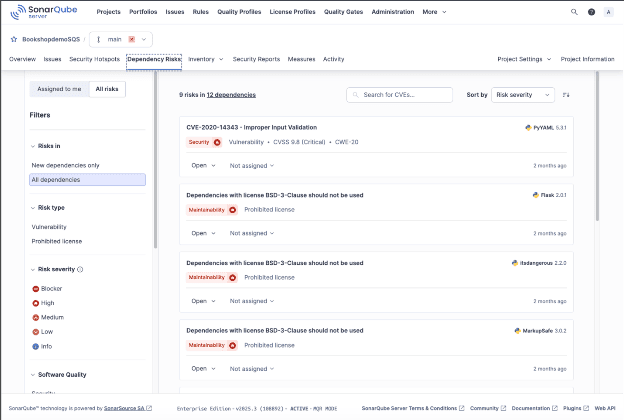
Interface


Strengths and Cautions
Strengths
- SonarQube supports both cloud and on-premises deployment options. This ensures that the solution can align with your own ways of working and goals, giving you specific control over operations.
- Integrates with most CI/CD pipelines and essential tools for DevOps teams. This allows you to incorporate the platform into your way of working, rather than having to alter processes and methodologies.
- Compatible with over 35 programming languages and frameworks, giving it a wide range of applications, sectors, and use cases.
- Enterprise plans include advanced security functionality, which helps address CVEs in open-source code. This includes vulnerability detection and license management, in addition to SBOM, taint analysis, and issue prioritization.
- SonarQube can be used at every stage of the software development life cycle. However, it’s best utilized early on to catch common code quality and security issues as quickly as possible.
Cautions
- It does not support Dynamic Application Security Testing (DAST) or perform checks during runtime, focusing instead on SAST, secrets detection, and SCA (which it does very well).
- Some features, like Single Sign-On, are locked behind the enterprise pricing plan.

Pricing
SonarQube offers several pricing plans for both their cloud-based and self-managed deployment offerings, allowing you to find the solution with features that match your needs and is of a compatible scale.
For SonarQube Cloud, these pricing plans are: Free, Team, and Enterprise.
Free – As the name suggests, this pricing plan is free. It’s designed for developers looking to try SonarQube Cloud and understand how it can add value to their organization.
Key features include:
- Scan private projects (up to 50k lines of code)
- Scan unlimited public projects
- 30+ languages and frameworks
- Limited to 5 users max
- Issue detection, SAST, and DevOps platform
Team – This plan starts at $65/month and offers a 14-day free trial. In addition to the features listed in the Free plan, Team adds:
- Unlimited users
- AI CodeFix
- AI Code Assurance
- Commercial support
Enterprise – This is SonarQube Cloud’s most comprehensive offering, with custom pricing depending on needs and requirements. In addition to all previously mentioned features, Enterprise adds:
- Enterprise SLA
- SSO
- Portfolio management and audit logs
- Management reporting, and custom dashboards
- Additional 6 enterprise languages
For SonarQube Server, these pricing plans are: Developer, Enterprise, and Data Center Editions.
Developer – This SonarQube Server edition is recommended for 100K+ lines of code and provides essential capabilities for small teams. This starts at $720 annually and offers a 14-day free trial.
Key features include:
- 33+ languages and frameworks
- Auto-detect presence of AI generated code
- AI Code Assurance
- Advanced bug detection
- Secrets detection
Enterprise – This edition offers deeper insights and enterprise performance and is recommended for 1M+ lines of code. You can start with a 14-day free trial. In addition to all previously mentioned features, Enterprise adds:
- Additional languages and frameworks
- AI CodeFix
- 24/7 white glove support available
- Detailed project health insights
Data Center – This is SonarQube Server’s most comprehensive edition and is recommended for 20M+ Lines of Code. In addition to all previously mentioned features, Data Center adds:
- Commercial support included
- Autoscaling based on demand
- High performance for distributed teams
Final Summary
SonarQube is ideal for all enterprises, especially those with complex development environments.
Teams who use vibe coding can benefit from SonarQube’s guardrails, which prevent AI-generated code from introducing unnecessary vulnerabilities. A free, open-source plan is available for use on private projects.
If you’re looking for a comprehensive and effective code scanning tool, SonarQube is a great option. It’s particularly well suited for developers looking to move fast while ensuring that their code is quality-assured.
The integrations with your existing CI/CD pipeline, in addition to the AI tools (for generating and checking code), make this platform a great solution to go for.
Read Further