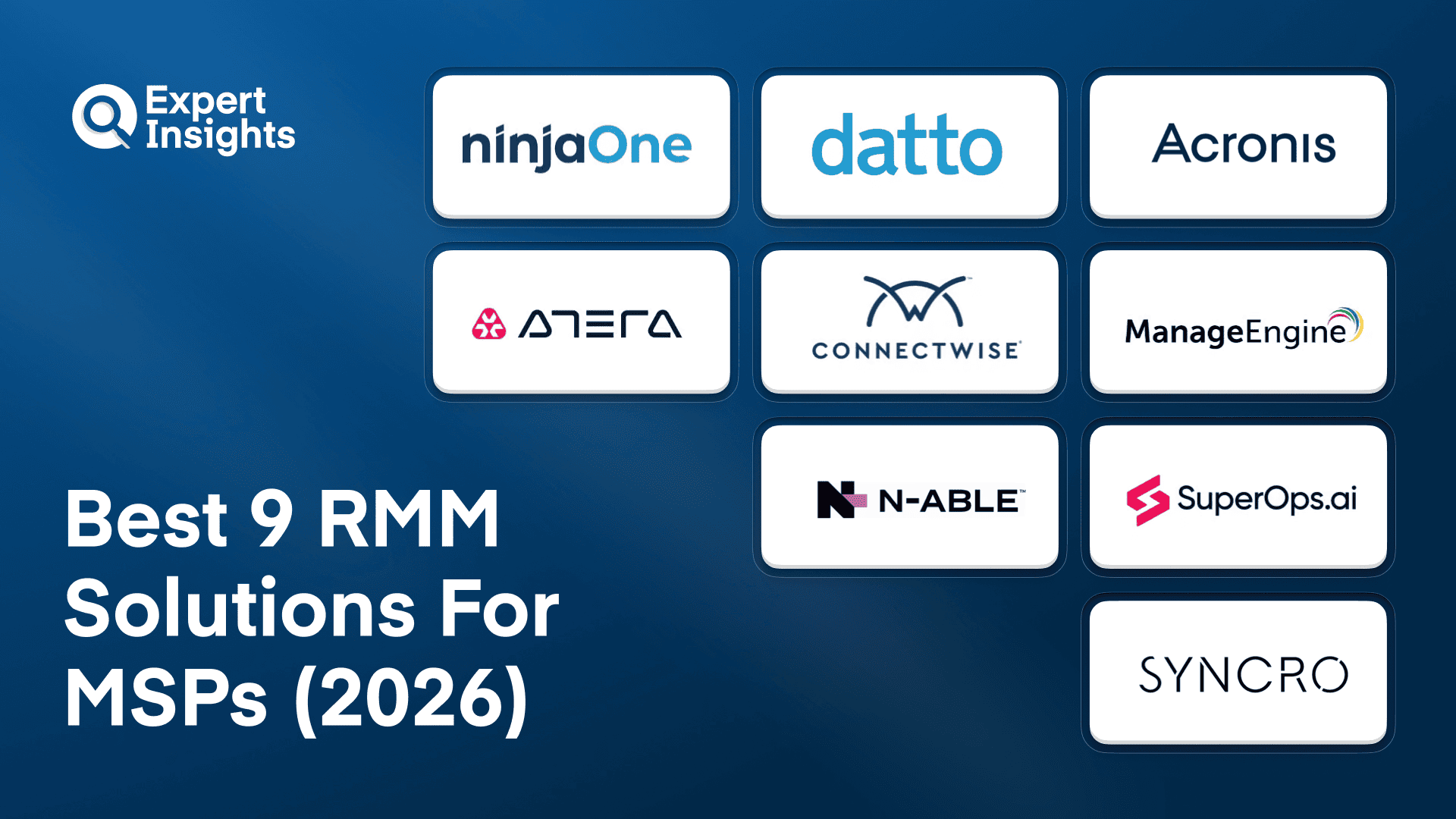
Best 9 RMM Solutions For MSPs (2026)
We reviewed 9 RMM platforms on automation depth, multi-client management, and the monitoring quality that tells you about problems before your clients do. Pricing structure matters as much as features at scale.
 Written by
Caitlin Harris
Written by
Caitlin Harris
 Technical Review by
Craig MacAlpine
Technical Review by
Craig MacAlpine
Remote monitoring and management (RMM), also known as network management or remote IT management, is a software platform that helps managed service providers (MSPs) remotely and proactively monitor client endpoints, networks, and computers.
A good RMM solution must gather health and status information about client software, hardware and networks and feed that back to the MSP via a central admin console; this allows them to remotely monitor, manage and resolve client tech issues, often without the end user being aware.
In this article, we’ll explore the remote monitoring and management solutions designed to help MSPs manage their clients’ IT environments.
What is RMM?
Remote Monitoring and Management (RMM) software is the core operational tool for Managed Service Providers. It lets MSPs monitor, manage, and maintain their clients' computers, servers, and networks from a central console without visiting each client site. RMM platforms handle patching, alerting, scripting, remote access, and reporting across all client environments, making it possible for a small MSP team to manage thousands of endpoints across dozens of clients.
RMM platforms for MSPs deploy lightweight agents to managed endpoints across multiple client tenants, reporting telemetry to a multi-tenant cloud console with per-client isolation. Monitoring covers system health (CPU, memory, disk, services), software inventory, patch compliance, and security posture with configurable alerting thresholds per client. Policy engines automate detection and response through conditional rules, scripting (PowerShell, bash), and pre-built remediation workflows. Patch management automates OS and third-party application updates with approval workflows, staged rollouts, and rollback. Remote access provides both background command execution and interactive screen control. Advanced platforms add AI-assisted triage, autonomous remediation agents, integrated EDR, network topology mapping, and NOC-as-a-service for 24/7 coverage. PSA integration connects monitoring to ticketing, billing, and contract management. Pricing models (per-device, per-technician, per-user) directly impact MSP margins and scale economics.
RMM Solutions for MSPs Solutions Compared
This table compares the 9 RMM platforms we reviewed for MSPs across their core capabilities.
| Product | Best For | Pricing Model | Built-in PSA | AI Features | EDR Integration |
|---|---|---|---|---|---|
|
NinjaOne
|
Reliable core RMM without complexity
|
Per-device
|
no
|
✓ (Patch Intelligence)
|
no
|
|
Datto RMM
|
SMB client management at scale
|
Per-endpoint
|
Via Autotask
|
no
|
no
|
|
Acronis RMM
|
Unified RMM, backup, and cybersecurity console
|
Per-workload
|
✓ (built-in)
|
✓ (AI-assisted scripting, fail-safe patching)
|
✓ (native Acronis EDR/XDR)
|
|
Atera RMM
|
AI-enhanced RMM with per-technician pricing
|
Per-technician
|
✓ (built-in)
|
✓ (Copilot + Robin)
|
no
|
|
ConnectWise RMM
|
Scaling with NOC and intelligent automation
|
Per-endpoint
|
Via ConnectWise Manage
|
✓ (IntelliMon)
|
no
|
|
ManageEngine RMM Central
|
Complex networks with diverse device fleets
|
Per-endpoint
|
no
|
✓ (ML forecasting)
|
no
|
|
N-able N-central
|
Complex multi-tenant environments at scale
|
Per-device
|
no
|
✓ (AI scripting)
|
✓ (SentinelOne)
|
|
SuperOps
|
Small to mid-sized MSPs wanting unified tools
|
Per-technician
|
✓ (built-in)
|
✓ (ML alerts)
|
no
|
|
Syncro
|
Midsized MSPs managing M365 environments
|
Per-user
|
✓ (built-in)
|
✓ (AI tickets)
|
no
|
How We Tested
Expert Insights independently researches and tests RMM and IT management solutions. We assessed each platform across remote monitoring capabilities, patch management, automation, endpoint security, integrations, deployment options, pricing models, and real-world customer feedback from MSPs. This article was written by Caitlin Harris and technically reviewed by Craig MacAlpine. Read our full methodology
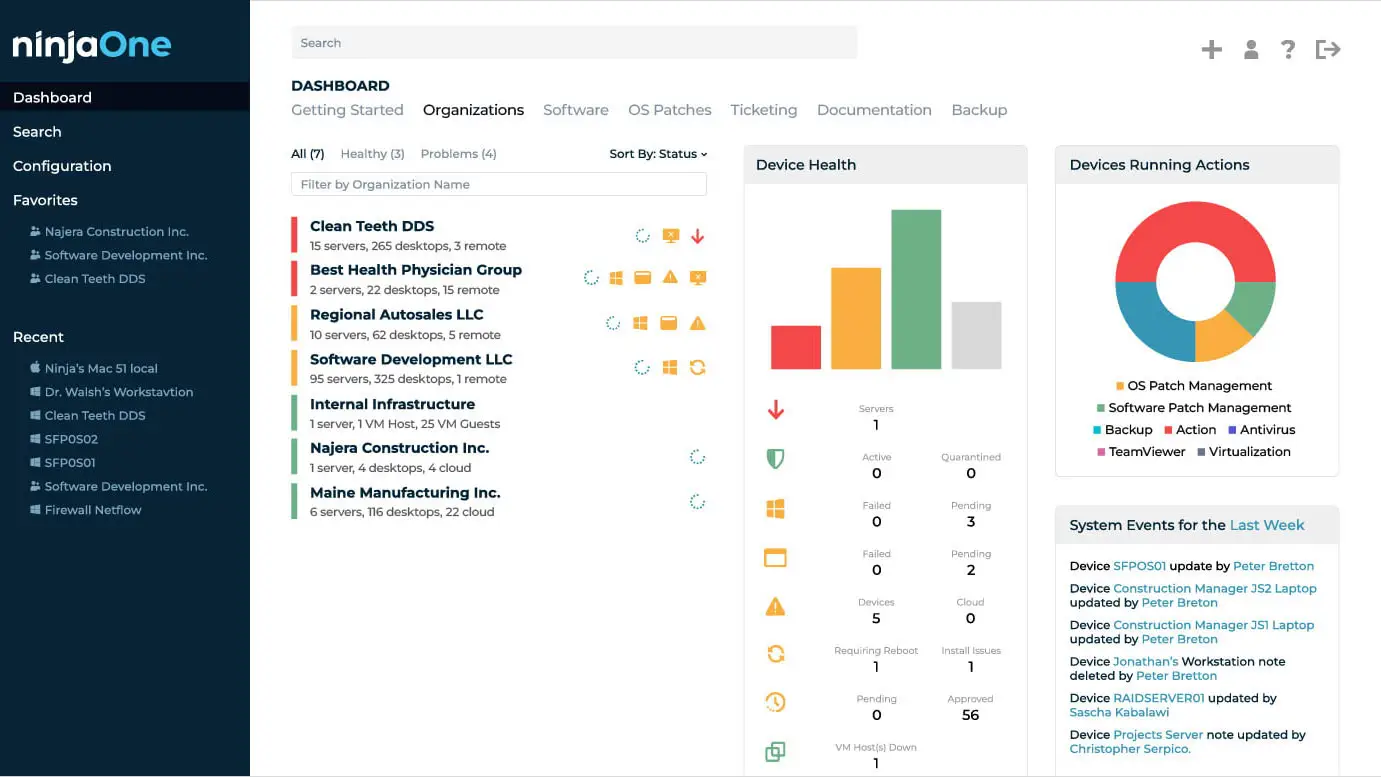
NinjaOne is a cloud-native RMM and unified IT operations platform. We were impressed by the platform’s depth; it manages Windows, macOS, and Linux endpoints, as well as servers, virtual machines, cloud infrastructure, and network devices, with conditional policies, hundreds of out-of-the-box scripts, and PowerShell for real-time remote commands. We think it’s well-suited to any MSP or IT team looking for a comprehensive, intuitive remote IT management platform.
- Multi-tenant console gives each client its own dashboard, policies, and reports
- Condition-based policies trigger scripts to fix stopped services, missed reboots, and open ports automatically
- Background tools include a command line, PowerShell, terminal, task manager, file explorer, services manager, and registry editor
- Autonomous Patch Management covers Windows, macOS, Linux, and 8,800+ third-party apps, and Patch Intelligence AI pauses unstable updates
- NinjaOne Remote launches attended, unattended, or ad-hoc Quick Connect sessions in two to three seconds
- Network device monitoring covers printers, firewalls, routers, and switches
- Device and SaaS Backup, Ticketing, PSA, Documentation, and Billing modules share the RMM’s data
- Integrations with Autotask, ConnectWise, Accelo, and SherpaDesk for PSA
We recommend NinjaOne for small to mid-market MSPs that want reliable core RMM their whole team can learn quickly, with patching, remote access, and backup in the same console. The interface is modern and intuitive, and we like the automation: PowerShell deployments run consistently across hundreds of endpoints, and conditional policies handle routine remediation without a technician. Something to be aware of is that NinjaOne has no software configuration management or native threat detection, so we recommend you add an EDR through one of its native integrations.
Strengths
Cautions
Datto RMM


Kaseya
Best for MSPs managing SMB clients that need automated endpoint management
Datto, a Kaseya company, provides cloud-based software and technology solutions designed for MSPs serving SMBs. Datto Remote Monitoring and Management (RMM) is their cloud-based platform that enables MSPs to remotely manage and support all contracted endpoints, with the goal of reducing costs and increasing efficiency of service delivery.
- Flexible patch management with configurable, automatable policies for Windows, macOS, Linux, and third-party applications via Chocolatey
- Real-time monitoring and reporting for proactive issue resolution and security tool verification
- Auto-response to alerts allows instant problem resolution
- On-demand and scheduled reports into client system health
- Integrates with Autotask PSA and over 200 third-party tools
Datto RMM is a strong RMM solution for MSPs serving SMB clients. As a 100% cloud-based platform, it’s highly scalable and accessible from anywhere. The platform integrates with existing PSAs for single-click access, as well as over 200 third-party tools and solutions. Datto is fully focused on supporting their MSP community, so we recommend their RMM solution for any MSP looking to become part of a supportive partner ecosystem.
Strengths
Cautions
Acronis
Best for: Security-first RMM natively integrated with backup, disaster recovery, cybersecurity, and Microsoft 365 management
Acronis RMM is a security-first RMM, built for MSPs, that is natively integrated with backup, disaster recovery, cybersecurity, and Microsoft 365 management. The entire platform is delivered via one agent, so you can monitor, patch, and recover endpoints under one single admin console.
The major advantage of Acronis RMM is the security-first approach with integrated cyber protection. This means that if a patch goes wrong and devices break, you can roll back immediately. AI-assisted patch stability scoring flags unstable patches before deployment, which reduces the risk of pushing a bad update to client environments.
We think it’s a strong fit for MSPs who want to consolidate RMM alongside cybersecurity and backup in one platform rather than managing separate tools. Acronis operates 54 data centers worldwide and works with more than 750,000 corporate customers and over 21,000 service providers.
- AI-assisted patch management for 300+ Windows applications
- Patch stability scoring for unstable patches before deployment
- Fail-safe patching can back up endpoints before patching to enable rollback, with automatic patching after backup recovery
- Device Sense passive device discovery across servers, workstations, smartphones, tablets, routers, switches, and printers
- ML-based anomaly detection and alerting across 20+ system and hardware metrics
- DeployPilot™ for AI-enhanced software deployment with Copilot-generated install commands, automatic digital signature checks, and anti-malware scanning of packages
- AI-assisted scripting with OpenAI integration for script generation, editing, and secure execution
- Built-in remote desktop and assistance (NEAR, RDP, Apple Screen Sharing, Quick Assist)
- Microsoft 365 security posture monitoring and management from the MSP console
- Integration with Acronis XDR: patch, script, and remotely access affected machines directly from the incidents view
Acronis offers a powerful RMM platform. Its key advantage is that the RMM is natively integrated with cybersecurity, backup and disaster recovery, all delivered via a single agent under a single admin console. The platform is easy to get deployed and up and running. We’d recommend it for MSPs looking to consolidate RMM alongside their security and backup stack.
Strengths
Cautions
Atera RMM


Atera
Best for MSPs wanting AI-enhanced RMM with per-technician pricing
Atera specializes in remote-first IT management. Their AI-powered platform unifies RMM, PSA, remote access, and reporting in a single console. Atera monitors client systems in real time and provides IT admins with alerts about potential problems before they happen. The platform also integrates with Splashtop to provide continuous remote support for MSP clients. We think the per-technician pricing model is the defining advantage for growing MSPs.
- Atera Copilot generates ticket summaries and automates administrative tasks; Robin handles routine troubleshooting without technician input
- Per-technician pricing covers unlimited endpoints, removing per-device cost pressure
- Activity logging supports transparency and compliance for client reporting
- Broad OS compatibility with centralized management of RMM, PSA, and remote access in one interface
Customers praise the broad OS compatibility and the centralized management of RMM, PSA, and remote access in one interface. The per-technician pricing model is consistently highlighted as a key advantage. Something to be aware of is that AI features take time to fully configure, and cloud SaaS workload management falls outside the platform’s scope.
We think Atera fits MSPs of any size that want an AI-enhanced RMM platform to automate workflows and deliver faster support. The per-technician model means scaling does not trigger per-device cost increases, which is particularly valuable for MSPs adding clients frequently.
Strengths
Cautions
ConnectWise RMM


ConnectWise
Best for MSPs scaling with intelligent automation and outsourced NOC
ConnectWise specializes in software for technology solution providers. Their services cover remote monitoring, IT management, and cybersecurity, and are designed to support MSPs of varying sizes. ConnectWise RMM is a unified remote monitoring and management platform built on the Asio platform for MSPs managing IT environments at scale. We think ConnectWise RMM fits MSPs that want to scale efficiently with intelligent automation and outsourced NOC capabilities.
- Drag-and-drop scripting engine simplifies task automation with real-time visibility into results
- Third-party patching covers over 7,000 applications with pre-deployment testing
- IntelliMon consolidates related alerts into single actionable tickets
- Integrated 24/7 NOC support handles monitoring, remediation, and patch deployment
Customers praise the integrated NOC services, which deliver round-the-clock monitoring, remediation, and patch deployment. The drag-and-drop scripting engine is highlighted for making automation accessible to less technical team members. Something to be aware of is that the platform requires customization for unique workflows, and the interface carries a learning curve for newer team members.
We think ConnectWise RMM fits MSPs that want to scale efficiently with intelligent automation and outsourced NOC capabilities. The IntelliMon alert consolidation and 24/7 NOC support reduce the operational burden on smaller teams, and the Asio platform supports growth to over 100,000 devices.
Strengths
Cautions
ManageEngine RMM Central

ManageEngine
Best for MSPs managing complex networks with diverse device fleets
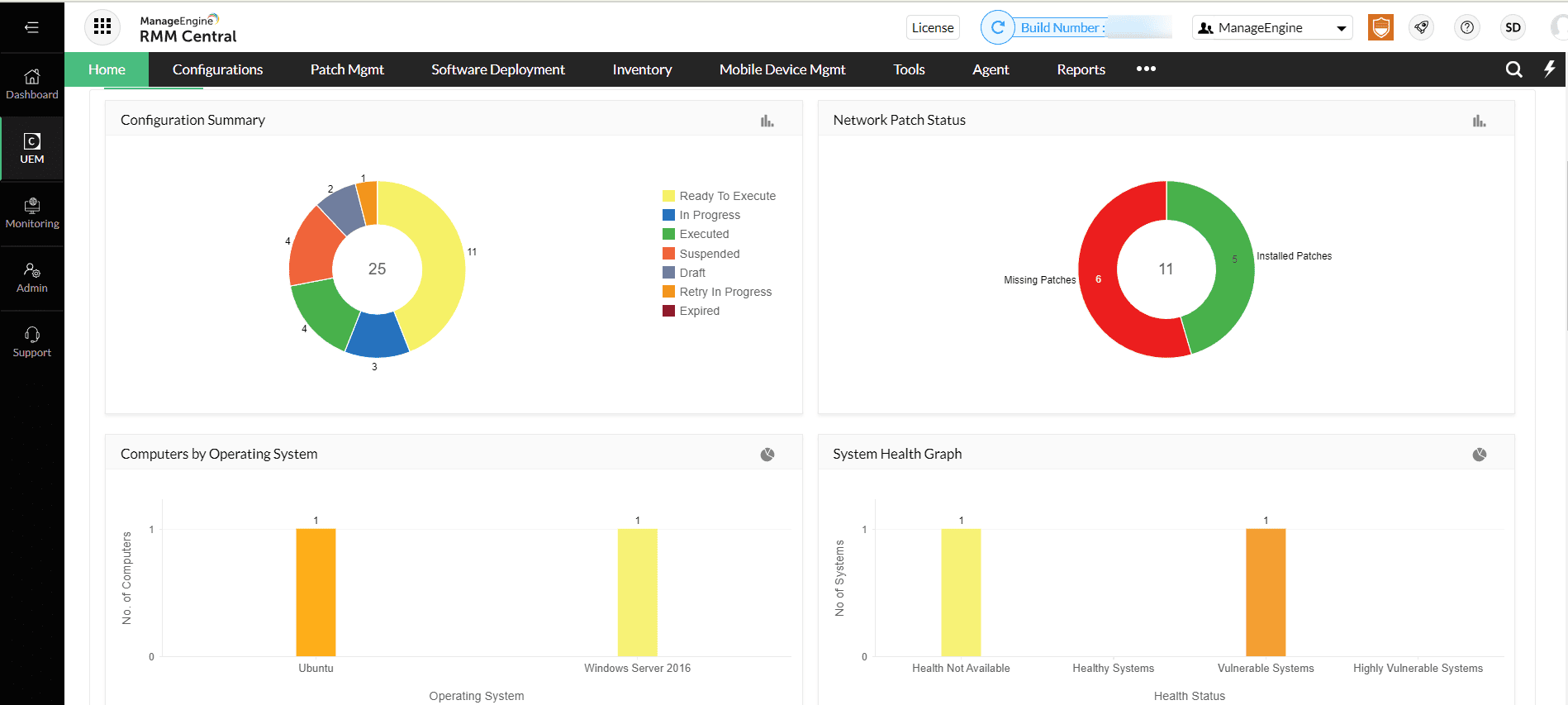
ManageEngine, a division of Zoho Corporation, provides IT management software that helps businesses manage and integrate their IT processes. RMM Central is ManageEngine’s remote monitoring and management platform that combines endpoint management, automated patching, and multilayer network mapping for MSPs managing complex, multi-site environments. We think RMM Central fits MSPs managing complex networks with diverse device fleets where broad discovery and patching coverage matter.
- Layer 2 mapping and subnet scanning automatically identify servers, routers, VMs, laptops, and mobile devices
- Patch management covers Windows, macOS, Linux, and 1,000+ third-party applications
- ML-powered forecast reports anticipate performance issues before they affect client operations
- Over 100 pre-built analytics templates for detailed client reporting
- Multilingual interface supports international MSP deployments
Customers praise the breadth of coverage and the multilingual interface for international deployments. The analytics and reporting capabilities get consistently positive marks. Something to be aware of is that the free edition lacks advanced security and configuration controls, and the interface can lag with large device inventories.
We think RMM Central fits MSPs managing complex networks with diverse device fleets where broad discovery and patching coverage matter. The Layer 2 mapping and ML-powered forecasting give network-heavy MSPs capabilities that lighter RMM tools lack.
Strengths
Cautions
N-able N-central


N-able
Best for MSPs managing complex, multi-tenant environments at scale
N-able, formerly the MSP division of SolarWinds before spinning off as an independent company in July 2021, specializes in providing monitoring, security, and business tools for MSPs. N-central is an enterprise-grade RMM platform that combines remote monitoring with integrated endpoint detection and response. With N-central, admins can use automation tools to onboard, configure, and patch hundreds of endpoints quickly. N-able has also added EDR capabilities to N-central through a SentinelOne integration, providing layered endpoint security alongside core RMM. We think N-central fits MSPs and IT service providers managing complex, multi-tenant environments.
- Over 700 pre-built scripts with AI-driven developer portal for automated script generation from natural language
- SentinelOne EDR integration adds threat detection without requiring a separate security stack
- Network topology mapping improves troubleshooting across connected devices
- Microsoft 365 and Intune integration strengthens device and user management
- Drag-and-drop automation lets any skill level design and standardize workflows
Customers praise the drag-and-drop automation that lets any skill level design workflows and standardize processes. The integrated EDR and network mapping capabilities are highlighted as differentiators for security-focused MSPs. Something to be aware of is that advanced automation requires setup time to optimize, and the platform carries more complexity than lighter RMM tools.
We think N-central fits MSPs and IT service providers managing complex, multi-tenant environments, especially those operating in regulated industries where endpoint security and compliance reporting matter. The SentinelOne EDR integration and 700+ pre-built scripts give larger MSPs the depth they need.
Strengths
Cautions
SuperOps

SuperOps
Best for small to mid-sized MSPs wanting unified RMM and PSA
SuperOps is a cloud-native unified RMM and PSA platform built specifically for MSPs. We think the combination of client management, ticketing, and endpoint monitoring in a single interface makes it a strong fit for small to mid-sized MSPs looking to reduce tool sprawl.
- Unified client management, project tracking, ticketing, contracts, billing, and IT documentation with endpoint monitoring
- Easy deployment via silent script across Windows and macOS
- ML-powered alerts detect unusual device activity early
- Integrations with Splashtop, TeamViewer, ScreenConnect, Webroot, and Bitdefender
Customers praise the clean UI, fast onboarding, and responsive support team. The unified PSA and RMM approach simplifies day-to-day operations for smaller teams. Something to be aware of is that PSA depth is lighter than legacy platforms for complex project billing, and AI features are still maturing beyond ticket summarisation.
We think SuperOps fits small to mid-sized MSPs that want to simplify their toolset through a unified RMM and PSA platform. If you need deep PSA capabilities or advanced automation, a more established platform may be a better fit.
Strengths
Cautions
Syncro


Syncro
Best for midsized MSPs managing Microsoft 365 environments
Syncro offers what it calls an Extended Monitoring and Management (XMM) platform, unifying RMM, PSA, and Microsoft 365 management in a single tool. We think the transparent per-user pricing with unlimited device coverage and no contracts is the biggest draw for midsized MSPs.
- Unlimited PC and Mac monitoring, automated alert remediation, patch management, and 500+ script library
- CIS-aligned Microsoft 365 baseline monitoring catches configuration drift across tenants
- Per-user pricing covers unlimited devices with no contracts for cost predictability
- Over 50 integrations support diverse workflows across PSA, remote access, and security tools, plus an MCP Server that connects Syncro data to Claude, ChatGPT and Copilot
- Automated ticket triage and dispatch prioritizes incoming tickets and routes them to the relevant technician
- Guided ticket resolution matches common issues to approved fixes
Customers praise the transparent per-user pricing and the contract-free model. The XMM approach of combining RMM, PSA, and Microsoft 365 management is highlighted as a differentiator. Something to be aware of is that advanced automation features require initial configuration, and the platform is newer to market with features still maturing.
We think Syncro fits midsized MSPs that manage Microsoft 365 environments and want endpoint monitoring, PSA, and M365 governance in one platform without per-device pricing pressure.
Strengths
Cautions
Other RMM Solutions for MSPs Services
We've looked at 20+ RMM solutions to create this list. Here's some other vendors for you to consider:
Offers remote monitoring, management, and automation of IT systems, with tools for patch, security, and scripting.
A mobile-first RMM solution for remote system monitoring and management.
A cloud-based RMM platform for remote monitoring, patch management, software deployment, and endpoint management.
Provides remote monitoring, asset management, patch management, and ticketing functionalities.
Offers remote monitoring and management tools with features like patch management, automation, and security.
Provides tools for remote access, endpoint management, patch management, and reporting.
RMM Solutions for MSPs Pricing
RMM pricing models directly impact MSP margins. Per-device, per-technician, and per-user models each have trade-offs depending on client base and growth plans.
| Product | Starting Price | Billing | Link |
|---|---|---|---|
|
NinjaOne
|
From $1.50/endpoint/month
|
Monthly
|
|
|
Datto RMM
|
From $2.99/endpoint/month
|
Annual
|
|
|
Acronis RMM
|
Contact for quote
|
|
|
|
Atera RMM
|
From $129/technician/month
|
Monthly or annual
|
|
|
ConnectWise RMM
|
Contact for quote
|
Annual
|
|
|
ManageEngine RMM Central
|
From $24/endpoint/year
|
Annual
|
|
|
N-able N-central
|
Contact for quote (per-device)
|
Annual
|
|
|
SuperOps
|
From $79/technician/month
|
Annual
|
|
|
Syncro
|
From $129/user/month
|
Monthly or annual
|
|
RMM Solutions for MSPs Checklist
These are the evaluation criteria we recommend when selecting an RMM platform for your MSP practice.
RMM consoles that flood your queue with noise waste technician time; platforms with alert consolidation and intelligent routing surface the problems that actually matter.
Patch management that works for Windows but struggles with macOS or third-party apps creates compliance gaps across your client base.
Pre-built scripts reduce the barrier for junior techs; AI-assisted script generation accelerates custom automation for experienced teams.
Disconnected RMM and PSA tools create sync issues; unified platforms simplify operations but may lack depth for complex project billing.
Per-device pricing punishes growth; per-technician rewards it. Calculate costs at 2x and 5x your current endpoint count.
Tools that require multiple clicks per connection slow down technicians handling dozens of sessions daily.
Platforms with built-in EDR eliminate separate security tool management; standalone RMM requires bolt-on products.
MSPs that can't staff 24/7 benefit from outsourced NOC services; verify the NOC actually resolves issues rather than just escalating them.
The Bottom Line
The RMM market continues to evolve with AI-powered automation, integrated security features, and unified PSA platforms becoming standard expectations. The right choice depends on your MSP’s size, client base, and existing toolset.
Organizations already invested in specific vendor platforms will find the most value in solutions that extend those investments. MSPs managing complex, multi-tenant environments should prioritize automation depth and security integrations, while growing teams should evaluate pricing models that scale without per-device cost increases.
For smaller MSPs, unified RMM and PSA platforms offer accessible entry points that reduce tool sprawl from day one.
RMM Solutions For MSPs: Everything You Need To Know (FAQs)
RMM software, also referred to as remote IT management or network management software, enables managed service providers (MSPs) to monitor their clients’ networks for IT and security issues and respond to those issues from anywhere, without causing disruption. With RMM tools, MSPs can identify and remediate security vulnerabilities without having to visit their clients in person, reducing travel costs as well as their mean time to respond to incidents. In turn, this leads to reduced downtime, increased security, and higher client satisfaction.
To achieve this, RMM software helps MSPs by gathering data about their clients’ networks, software, and endpoints; tracking network and device health; generating alerts or tickets when an issue is identified; supplying the MSP with health, performance, and activity reports; and automating scheduled maintenance tasks such as patching. By allowing the RMM tool to take care of these tasks, MSPs can dedicate their time, energy, and resources to tasks that require more human intervention, such as consulting with their clients on how they can expand and grow their business.
When an RMM platform is deployed, an agent is installed on all of the client workstations, servers, and endpoints that the MSP wants to monitor, and a central management component is installed in the MSP’s server. The agents then feed back health and status information to the MSP, alerting them in real-time to any changes in health or performance. If a change or issue is detected, the RMM tool generates an alert or ticket, which it sends to the MSP so that they can resolve the issue. The best RMM tools add contextual information to these alerts and classify each one in terms of issue type and severity, so that the MSP can quickly identify what action they need to take and prioritize more critical issues—often before the client even realizes there’s an issue at all.
There are a few reasons why an MSP or IT service provider may want to use an RMM tool. First, RMM tools give MSPs complete remote visibility of their clients’ networks, no matter where they or the clients are based. This means that even smaller MSPs and IT teams can support and manage multiple clients, as they don’t have to travel to visit a client each time an issue arises.
Second, RMM software offers lots of automation that enables MSPs to streamline their issue detection and resolution workflows. This, in turn, allows the MSP to spend less time on manual, time-consuming tasks, so that they can support more users and endpoints—effectively allowing them to scale their support operations.
But RMM software doesn’t only enable MSPs to scale their support—it also enables them to offer better support! With a strong RMM tool, MSPs can get ahead of potential issues more quickly by proactively and continuously monitoring their clients’ networks for indicators that something’s wrong. This helps them identify and resolve problems more quickly, minimizing downtime and disruption, and boosting customer satisfaction.
Finally, the best RMM solutions make it much easier for MSPs to manage their clients’ networks by providing them with a single pane of glass from which they can view all the metrics they need. To achieve this, RMM tools integrate with PSA, backup, endpoint security, and patching software, among other IT tools. This means that the RMM software’s dashboard can act as a central control panel for multiple tools.
While all RMM tools offer a slightly different feature set to help you meet the specific needs of your clients, there are some features you should look out for in any strong RMM software. These include:
Remote monitoring
Your RMM tool should gather health and status information client software, hardware, and networks and feed that data back to you in as close to real-time as possible so you can stay on top of maintenance.
Remote management, remote control, and secure remote access
You should be able to configure your clients’ IT security and respond to issues remotely, so that you don’t have to add travel time to your mean time to respond. This should include the ability to manage mobile devices.
Automation
Your RMM software should automate routine tasks such as onboarding, patch management, alerting, and ticketing to save you time and allow you to focus on incident response.
Reporting and analytics
From your RMM tool’s central management console, you should be able to generate clear, customizable reports into the health and security status of your clients’ networks at a granular level.
Integrations
Your RMM software should integrate easily with your user directory for easier onboarding and offboarding. It should also integrate with your existing security tools, ticketing tools, and PSA software.
IT Management Resources
Further reading on it management from Expert Insights — buyers' guides, comparison articles, and platform-specific shortlists.


 Written By
Caitlin Harris is the Head of Content at Expert Insights. As an experienced content writer and editor, Caitlin helps cybersecurity leaders to cut through the noise in the cybersecurity space with expert analysis and insightful recommendations.
Prior to Expert Insights, Caitlin worked at QA Ltd, where she produced award-winning technical training materials, and she has also produced journalistic content over the course of her career.
Caitlin has 8 years of experience in the cybersecurity and technology space, helping technical teams, CISOs, and security professionals find clarity on complex, mission critical topics like security awareness training, backup and recovery, and endpoint protection.
Caitlin also hosts the Expert Insights Podcast and co-writes the weekly newsletter, Cyber Weekly.
 Technical Review
Craig MacAlpine is CEO and Founder of Expert Insights. Before founding Expert Insights in August 2018, Craig spent 10 years as CEO of EPA Cloud, an email security provider that rebranded as VIPRE Email Security following its acquisition by Ziff Davis, formerly J2Global (NASDAQ: ZD) in 2013.
Craig is a passionate security innovator with over 20 years of experience helping organizations to stay secure with cutting-edge information security and cybersecurity solutions.
Using his extensive experience in the email security industry, he founded Expert Insights with the singular goal of helping IT professionals and CISOs to cut through the noise and find the right cybersecurity solutions they need to protect their organizations.