

Microsoft 365 accounts are being targeted as part of a large-scale password spray campaign, which has seen 81 million login attempts in just two weeks.
78 accounts across 64 organizations have already been compromised, threat researchers at Huntress warned.
Huntress traced the activity to an internet infrastructure provider with data centers in Hong Kong and Wuhan and a registered business address in New York. The company did not respond to Huntress’s abuse report.
Fifteen of the 23 organizations hit during a June 22 spike had MFA in place. failed because it had not been configured to cover the authentication path the attackers used.
How The Attack Worked
The campaign abused OAuth ROPC (Resource Owner Password Credentials), a deprecated authentication flow that sends credentials directly to the token endpoint without triggering MFA. That meant organizations with MFA in place were still breached because their policies did not cover this specific path.
The credentials were old username and password combinations drawn from previous breaches, targeting users who had not rotated their credentials after earlier compromises. Rather than targeting a specific industry, the attempts skewed toward accounts that appeared frequently on compromised password lists.
Attackers validated the stolen credentials through the ROPC flow, which does not support modern authentication frameworks including MFA and SSO. Because ROPC bypasses the interactive login process entirely, there was no prompt for a second factor.
Why MFA Still Failed
Fifteen of the 23 organizations hit during a June 22 spike had MFA in place. The chart below shows how MFA was configured across the impacted organizations:
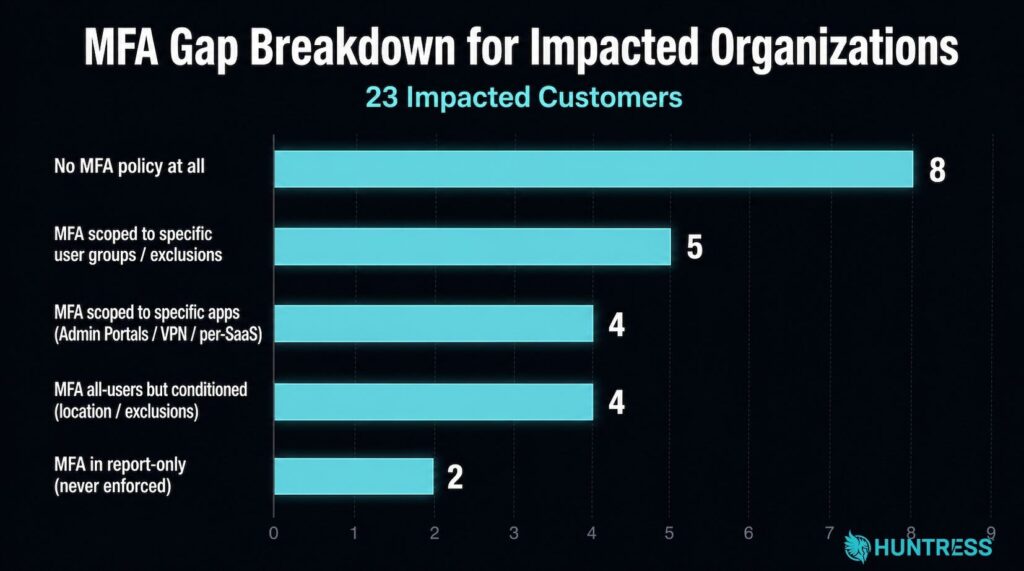
Eight had no MFA policy at all. Of those that did, the configurations consistently left the ROPC authentication path uncovered, either by scoping MFA to specific apps or user groups, conditioning it on location, or leaving it in report-only mode.
“While threat actors in this campaign were able to get in despite MFA being set up, the takeaway should not be that MFA doesn’t work at all; instead, organizations should ensure that their MFA policies are properly configured to address the authorization flow used across these incidents,” Huntress said.
Huntress recommends that conditional access policies require MFA for all users, all cloud apps, and all client app types unconditionally, and that organizations block ROPC flows using the userStrongAuthClientAuthNRequired setting.


