
Expert Insights Verdict
Crogl is a strong solution for SOC teams that want to pull together disparate streams of data from across their security tools and empower analysts to work faster and more efficiently. It connects to all of your different security tools and allows analysts to query the data using AI to investigate alerts and hunt potential threats. A key focus of the solution is to keep your team in control. You can use any LLM you choose, so you stay in control of the data, the outputs and the cost. Crogl can run on-premises or fully air-gapped. Crogl is also very transparent: each investigation report shows the full search trail behind its findings, and a limitations section clearly outlines where answers may be missing context or data. The interface is chat-first, so it feels more like an AI assistant than a traditional SOC console. The interface is clean and straightforward to use. You can also use the system headlessly, with scheduled jobs that write full investigations directly into Jira tickets. Best for: Larger teams at organizations with 2,500 or more employees, particularly critical infrastructure organizations such as utilities, oil and gas companies and government agencies, which need to keep their data and their AI within their own environment.
Strengths
Cautions
Learn More
Fast Facts
- Headquarters: Los Ranchos, New Mexico
- Founded: 2023
- Ownership and funding: Venture-backed; $30 million raised from Menlo Ventures, Tola Capital and S3 Ventures
- Employees: 30
- Sectors: Government and defense, financial services, and energy and utilities
- Deployment: On-premises, private cloud (AWS, Azure or GCP) or fully air-gapped
- How to buy: Through channel partners, including systems integrators and MSSPs
Crogl’s Approach
Crogl is an AI platform for enterprise security that investigates alerts and hunts threats across a team’s existing tools, so analysts close tickets faster. It connects to all of your different security tools and queries the data where it lives, so you can use AI to investigate alerts and hunt potential threats. Analysts can use Crogl’s chat workbench to ask questions and run investigations, or let it investigate tickets automatically in the background.
Crogl was founded in 2023 by a team from Splunk, Sandia National Laboratories and Databricks. Two decisions shaped the product from the start: Crogl ships software that organizations run themselves, including on-premises, and it doesn’t build or run its own AI models. Crogl works with any LLM you choose, from a frontier model through your own API keys to a self-hosted model on your own hardware, and recommends which models perform best.
Crogl doesn’t ask you to re-ingest or normalize data into a new schema; it queries each source in its own format. It connects to any security tool with an API or MCP server, and ships with a skill that builds a new connector when one doesn’t exist. Behind the connectors sits a knowledge graph that links fields describing the same thing, such as an IP address stored as src_ip in Splunk, host IP in Databricks and IP in Jira. The graph keeps what Crogl learns about your environment separate from the LLM, so you can switch models without losing that context.
The solution is extremely customizable. There is a library of ready-made skills, and a skill builder where you can build your own workflows to match the specific use cases of your SOC. Skills combine deterministic code with LLM reasoning and can run custom Python. Analysts can configure automations and skills to address almost any potential use case, including looking for signs of ransomware or triggering remediation playbooks in your SOAR platform.
Crogl is clear that it supports analysts rather than replacing them. It gathers and correlates the evidence, recommends what to do, and leaves the final decision to the human.
Market Position
Crogl competes in the increasingly crowded AI SOC market. It wins with organizations that need sovereignty: those that must run their own software and their own model, with no data leaving their environment.
Its other USP is that it queries data in place rather than bringing data into its own platform and normalizing it to a single schema. The platform is highly extensible, connecting to almost any tool and letting SOC teams build their own skills on top. Crogl describes itself as a platform more than a point tool, and says organizations often start with one use case and build out from there.
Crogl sells almost entirely through channel partners. Crogl is popular with critical infrastructure, defense and large enterprise organizations.
Use Cases
Investigating a Phishing Ticket Across Every Tool
Crogl’s core use case is the tedious data gathering that comes before an analyst’s decision. A typical phishing ticket might mean querying Splunk for email data, a Snowflake data lake for recent DNS records, VirusTotal for reputation, and firewall logs for outbound connections, each in its own query language. This can take an analyst an hour or more.
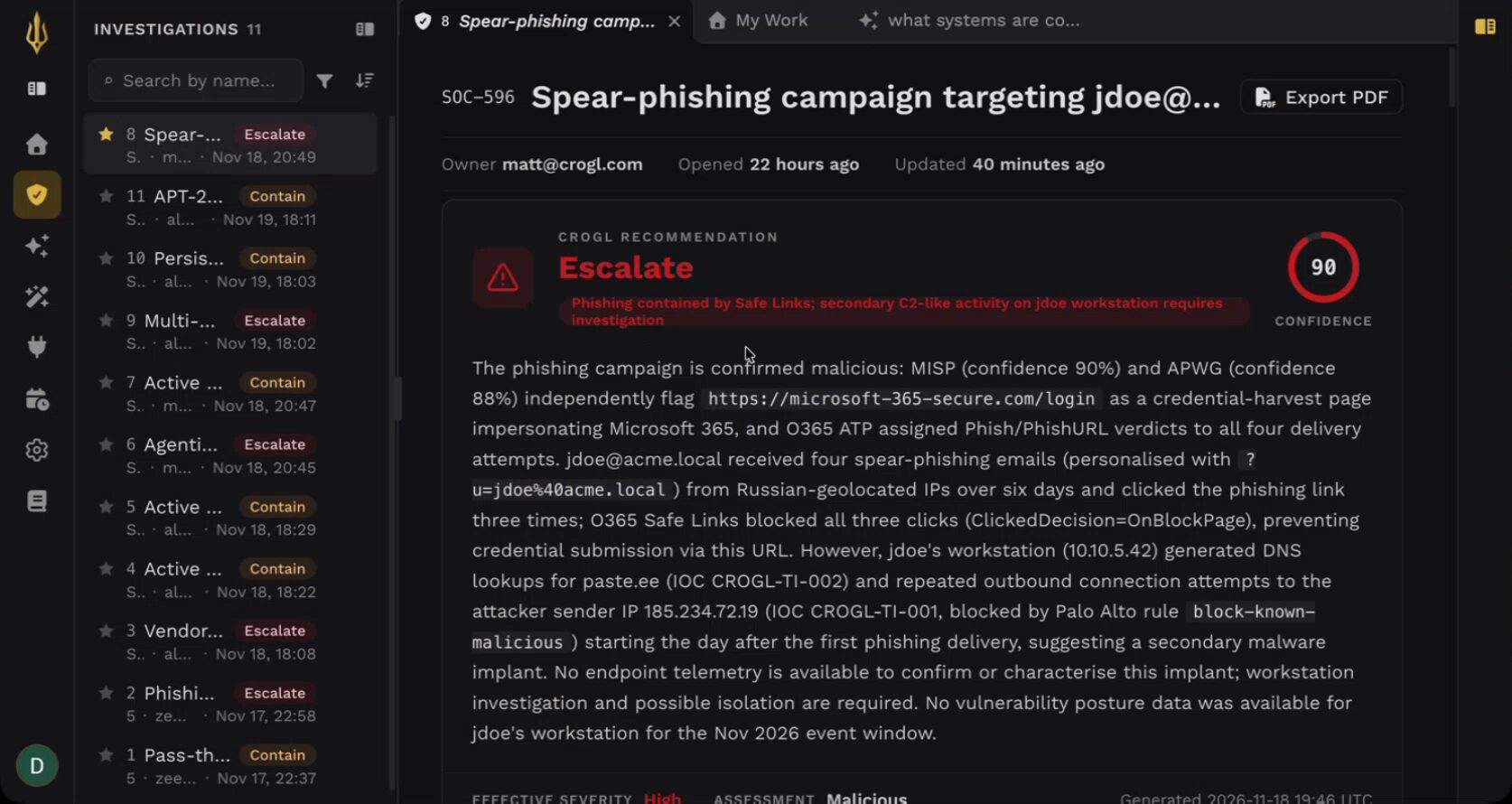
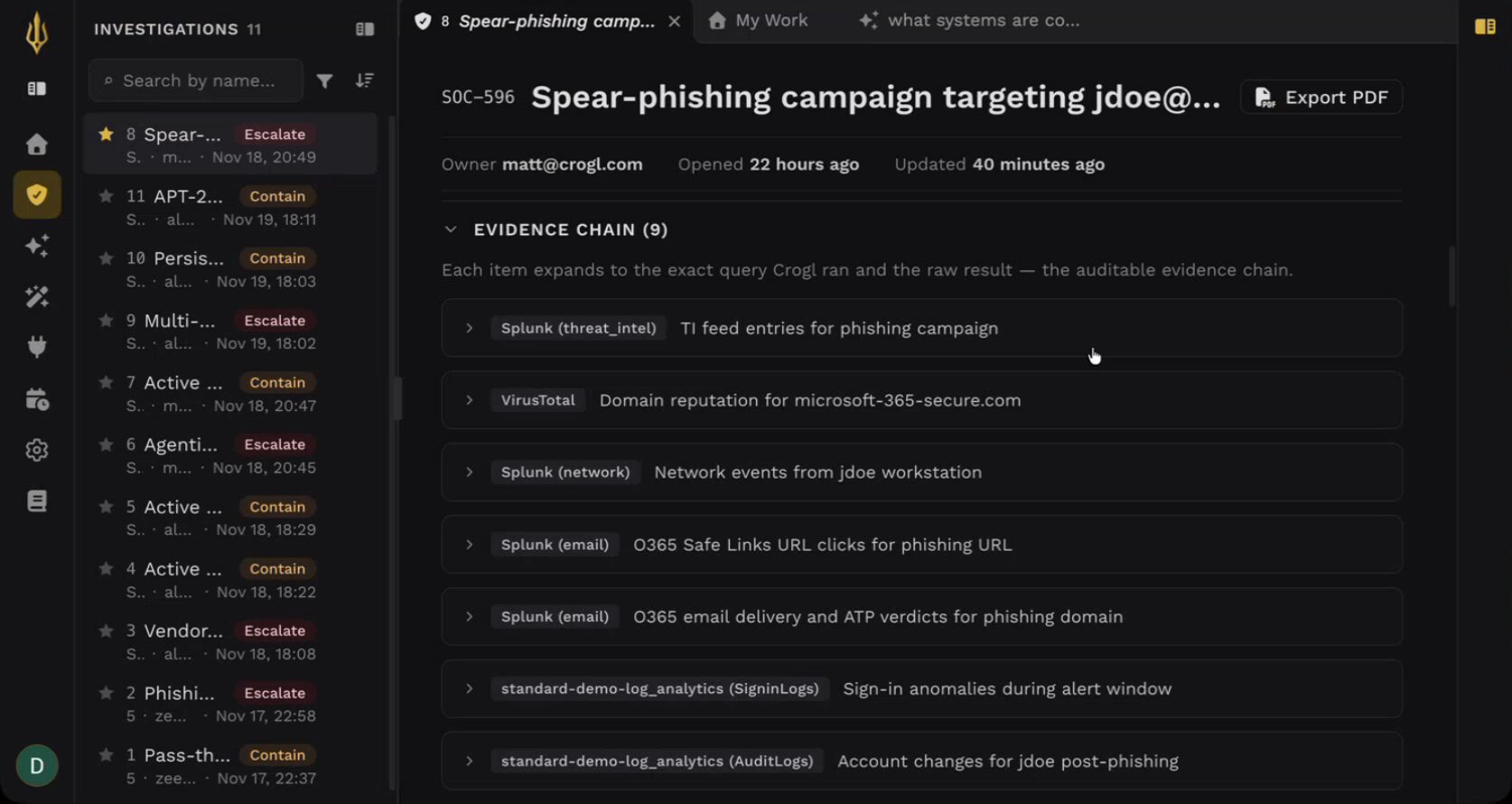
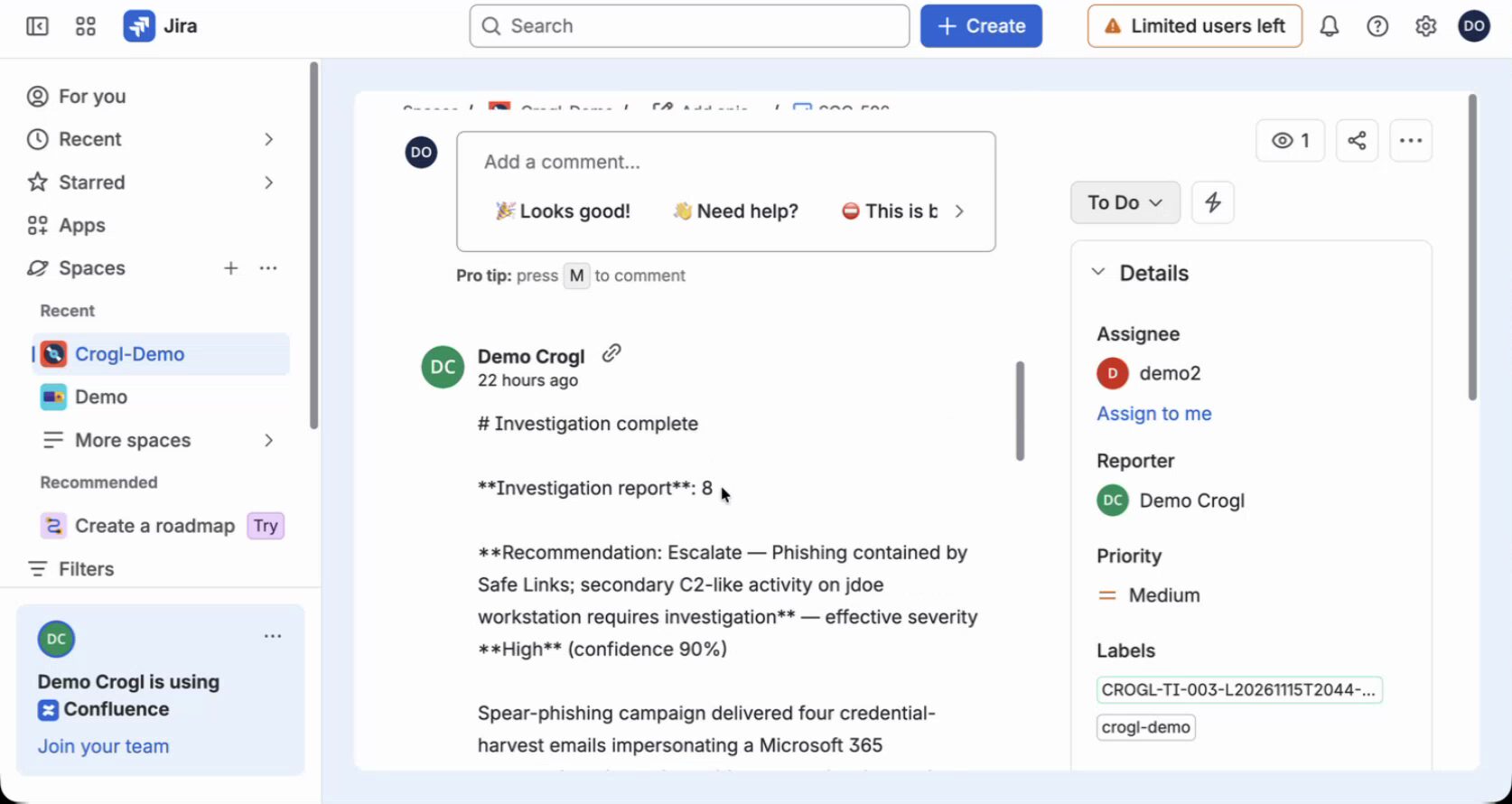
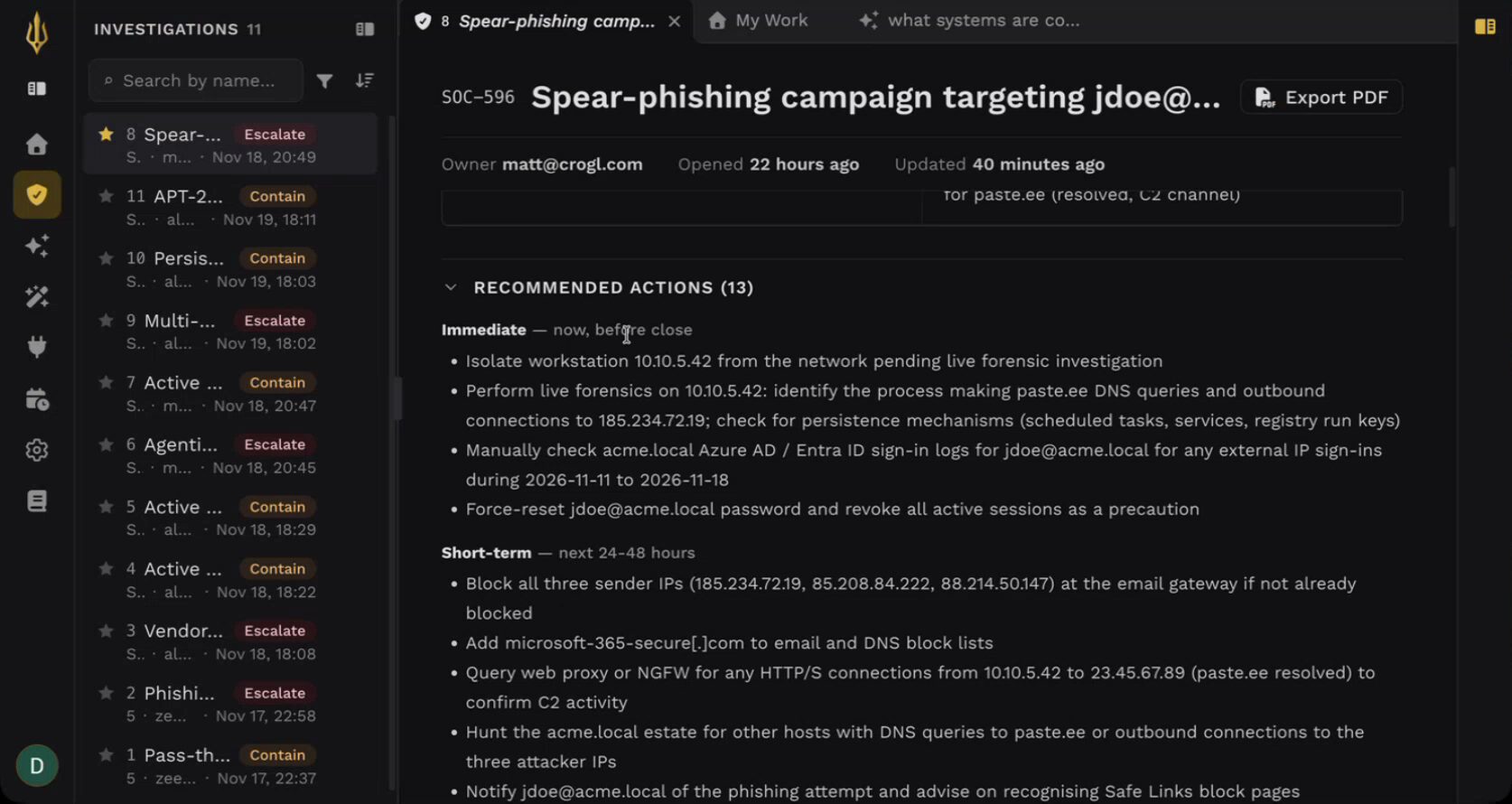
Crogl runs those searches itself, correlates the results and writes up an investigation report. In one example we saw, a spear-phishing report opened with an Escalate recommendation and a confidence score of 90, followed by a summary of the attack, who and what was affected, recommended actions and the evidence behind each finding. Responses are detailed and provide clear recommendations for analysts to implement, and the analyst reviews the findings and makes the call.
Automated Ticket Triage in Headless Mode
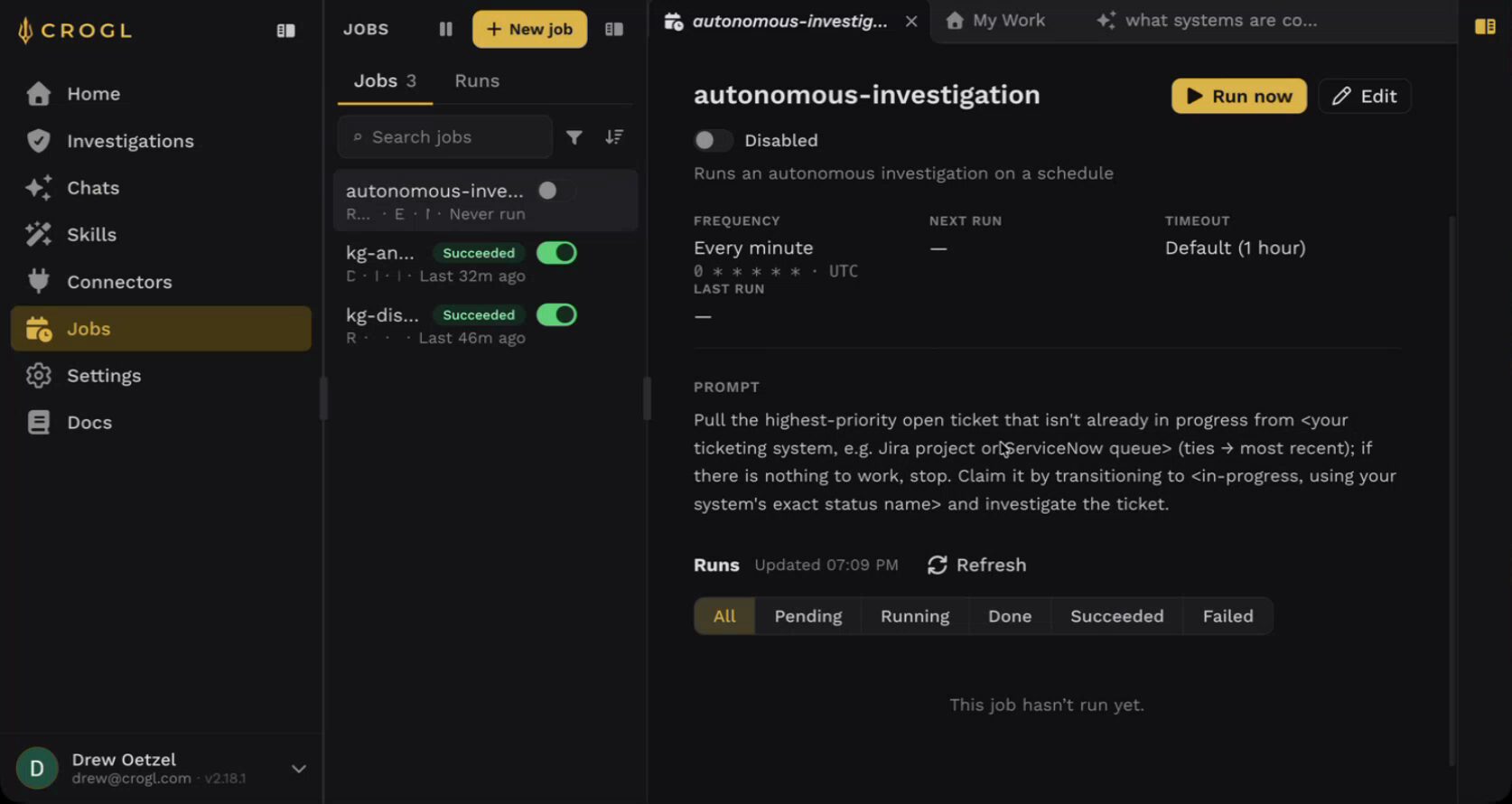
Many SOC teams using Crogl rarely open the Crogl interface. Instead, they set up jobs: scheduled tasks written as plain-language prompts. The job shown in the screenshot below pulls the highest-priority open ticket that isn’t already in progress from Jira or a ServiceNow queue, marks it as in progress, investigates it and appends the findings to the ticket.
Crogl skips tickets that someone else has already picked up, so a team doesn’t investigate the same ticket several times. A team lead or a small group typically owns the jobs to stop them overlapping. The full investigation report, including the recommendation, confidence, evidence and limitations, is attached to the Jira ticket, so analysts can read it there.
Ad Hoc Threat Hunting
The chat workbench handles ad hoc hunts in natural language. An analyst can upload a PDF of a new CISA advisory and ask whether the organization is affected, which systems might be, and whether there are traces of the activity.
Analysts can also ask Crogl to check a single host, for example a laptop a user thinks received a phishing email, by giving it the host name or IP address.
Crogl queries the connected sources and summarizes the hunt in the chat, including the time range and sources searched, what matched, and next steps. Depending on configuration, the summary stays in the chat or is written to the team’s ticketing or case system.
Onboarding New Analysts
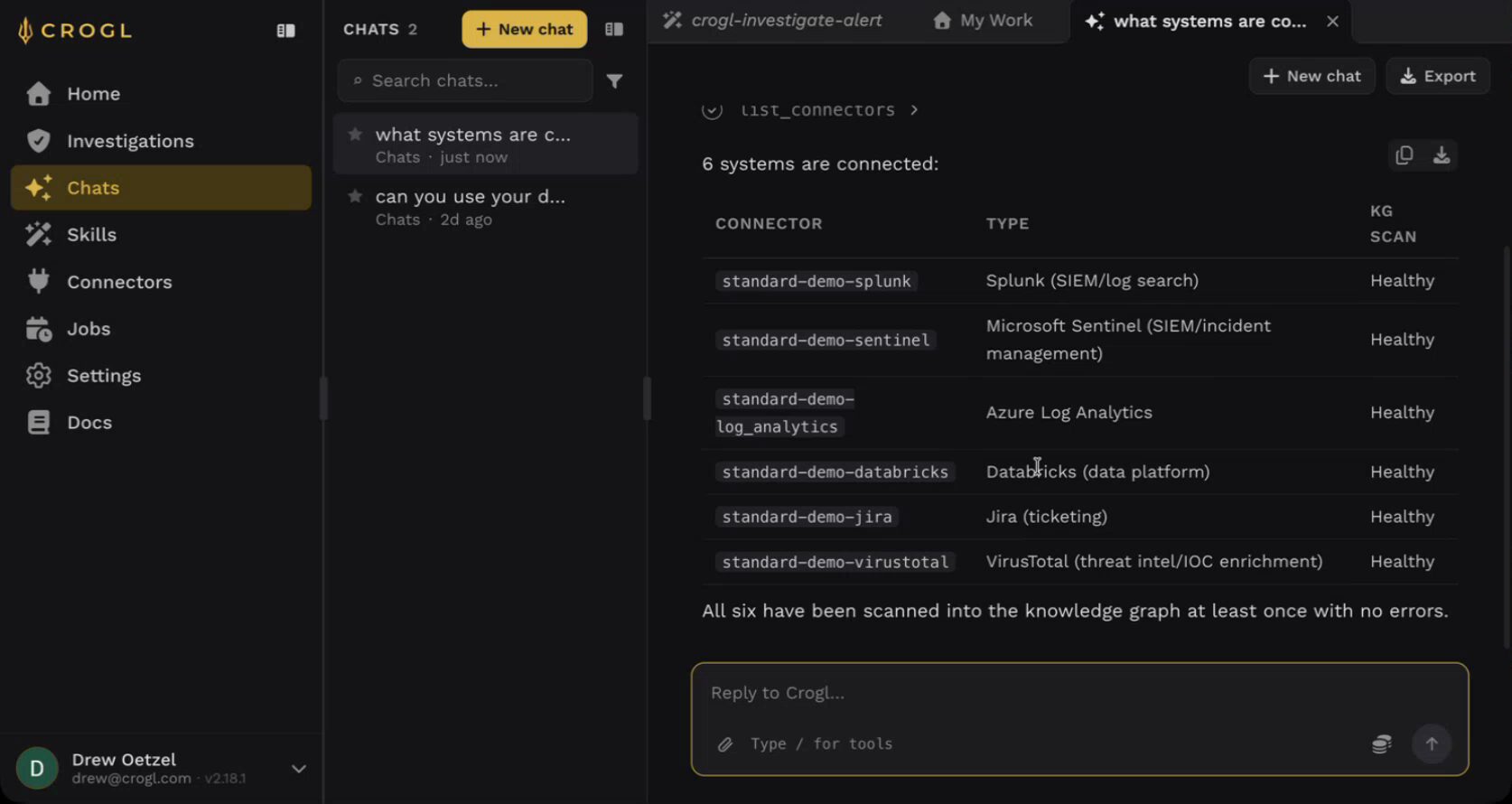
Crogl’s chat helps a new analyst find their way around. On their first day, an analyst can ask which systems are connected, and Crogl lists each connector, what it is and whether it is healthy.
Crogl also has a built-in documentation skill that reads Crogl’s own documentation, so analysts can ask questions such as how to build a skill, how best to query Splunk, or what hardware Crogl needs, rather than searching the docs themselves.
Daily Advisory Hunts as a Custom Skill
You can turn a recurring hunt into a skill and schedule it. Crogl gave the example of a daily job that pulls the latest CISA advisories and hunts across your environment for exposure to each one.
The same process works for CRISP, ISAC and vendor bulletins: each advisory is parsed into indicators, techniques and affected systems, then checked against current and historical data. The result is an assessment of whether the organization is affected and what evidence Crogl found.
Evidence-Gated Response Through Your SOAR
Crogl Enterprise includes governed auto-remediation. Crogl sits in front of your SOAR platform and decides which alerts have earned an automated action. An alert clears only when Crogl finds at least one independent confirming source in live data and no contradicting sources. Crogl runs the same check again at the point of dispatch, then triggers your own SOAR playbook through its webhook. Alerts that don’t clear go to an analyst.
Because skills can run custom Python, a team could write a skill that contains a device when an investigation finds a vulnerability, the confidence score is above a set threshold, and the recommended step is containment. Crogl says this kind of action doesn’t ship out of the box, because every environment is different; it provides the building blocks.
Audit Evidence and an Auditable AI Agent
Crogl records every action it takes in the platform. That serves two purposes: security teams can audit what Crogl’s own AI agent did and where it got its data, and auditors can be given an evidence trail without the team rebuilding it at audit time.
SOC teams can also build their own audit skills, for example to produce the CRISP report a utility needs for its auditor. Crogl’s website lists SOC 2, ISO 27001, NIST CSF, NIST AI RMF, MITRE ATT&CK and CMMC among the frameworks this evidence supports, and notes that Crogl supplies evidence rather than certifying compliance.
Sovereign and Air-Gapped Deployment
Crogl runs anywhere from a public network to an air-gapped “flyaway kit”, with the model running on your own hardware. It can be deployed in your own data center with no outbound connections, in your own AWS, Azure or GCP environment, or in a fully disconnected network. This is the use case Crogl leads with for government, defense, utilities, oil and gas, and other critical infrastructure organizations that can’t send security data to a third-party service or model.
LLM Failover and Swapping Models
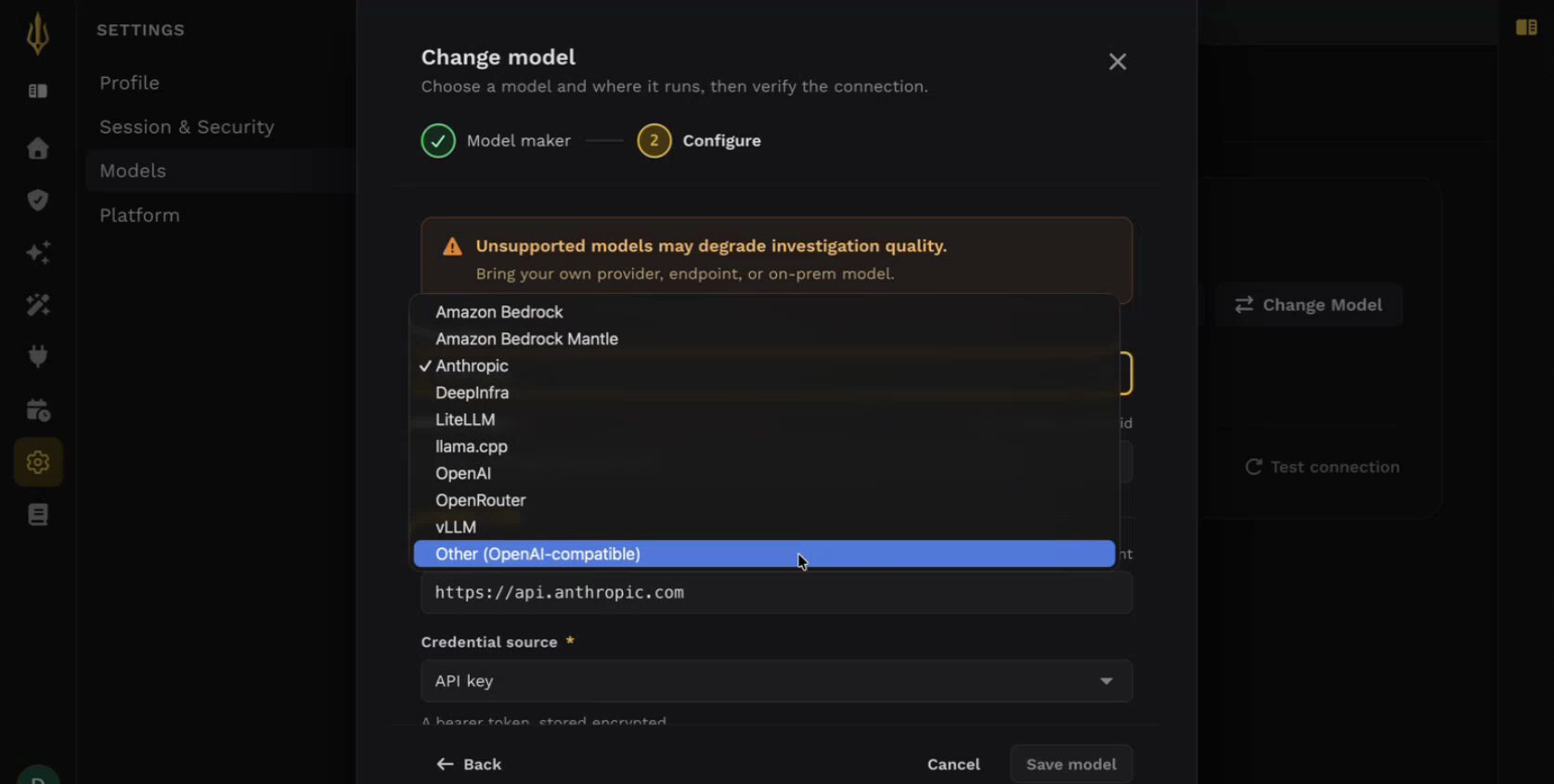
Because Crogl doesn’t run its own models, you can choose and change the LLM in the settings. Providers include Amazon Bedrock, Anthropic, DeepInfra, LiteLLM, llama.cpp, OpenAI, OpenRouter and vLLM, plus any OpenAI-compatible endpoint. If a model provider has an outage, the team can switch to another model with its own API keys. Because the knowledge graph lives in Crogl, the new model picks up with the same understanding of the environment rather than starting from scratch.
Connecting Tools Without a Ready-Made Connector
Crogl’s goal is to connect to every tool in your environment. When a connector doesn’t exist, Crogl ships with a skill that builds one for any tool with an API or MCP server, given API keys and access. For example, an old database holding years of firewall data can be connected the same way. New sources are scanned into the knowledge graph, so investigations can use them straight away.
User Experience
The interface is chat-first, so it feels more like an AI assistant than a traditional SOC console. It’s clean and straightforward to use. The main navigation covers Home, Investigations, Chats, Skills, Connectors, Jobs, Settings and Docs, and the chat screen opens with shortcuts to investigate an alert, run a threat hunt, create a skill, add a connector or write an incident report.
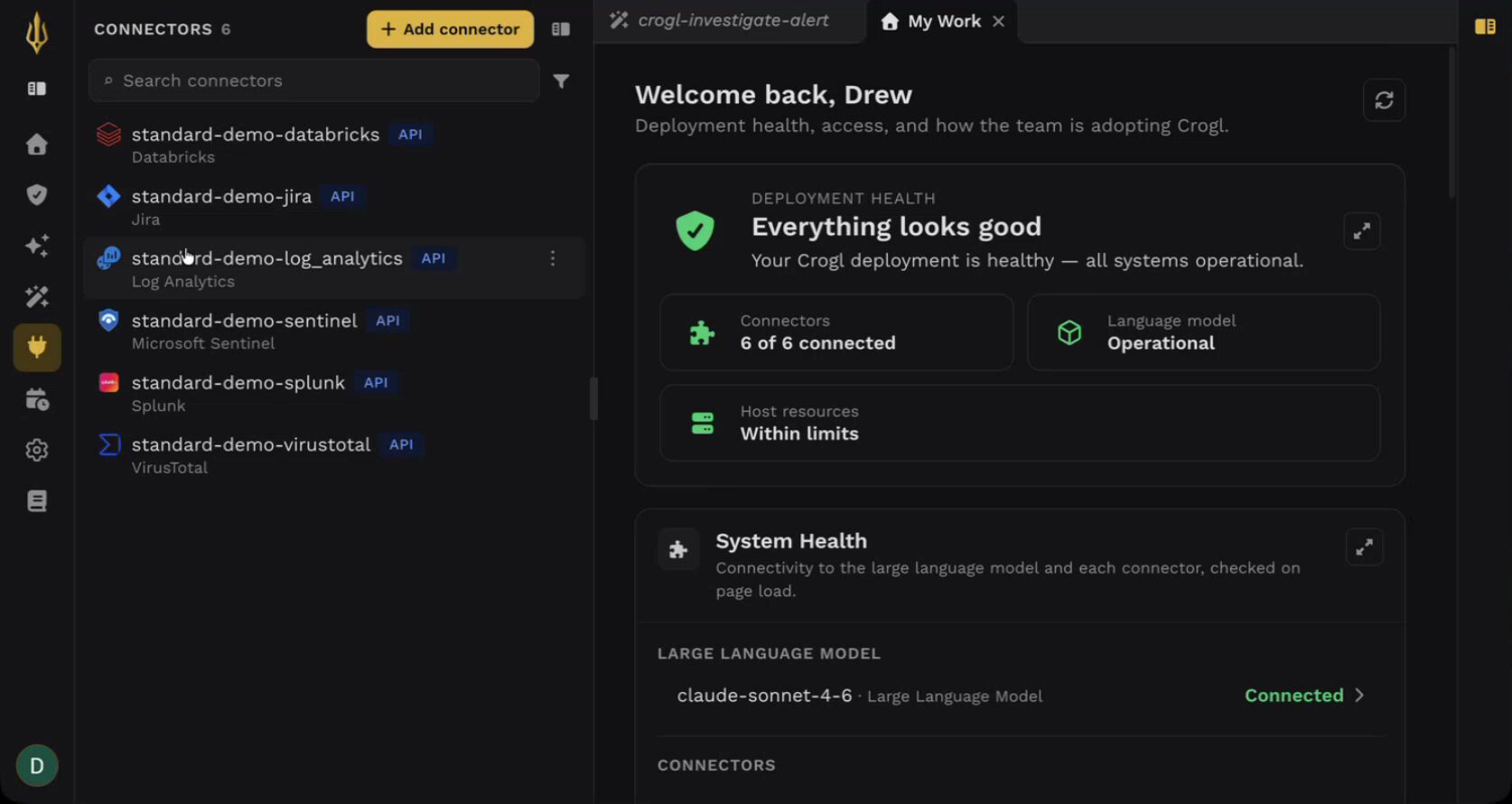
The home screen shows deployment health at a glance: how many connectors are connected, whether the language model is working, and whether the host has enough resources. Connectors sit in a side panel, with a button to add new ones.
Some teams will prefer to use the system headlessly. This is where Crogl automatically provides analysis and recommendations inside your ticketing system, writing its full report back to the ticket in Jira, so a new alert already comes with deep context on the incident, remediation steps, and more.
Each investigation report opens with Crogl’s recommendation (escalate, contain, or close as a false alarm) and a confidence score, then sets out the who, what, when, where, why and how, and recommended actions split into immediate, short-term and long-term steps.
It goes on to show the evidence chain of searches run, a timeline, impact analysis, known vulnerabilities on affected hosts, MITRE ATT&CK mapping, indicators of compromise and references. Reports can be exported as a PDF.
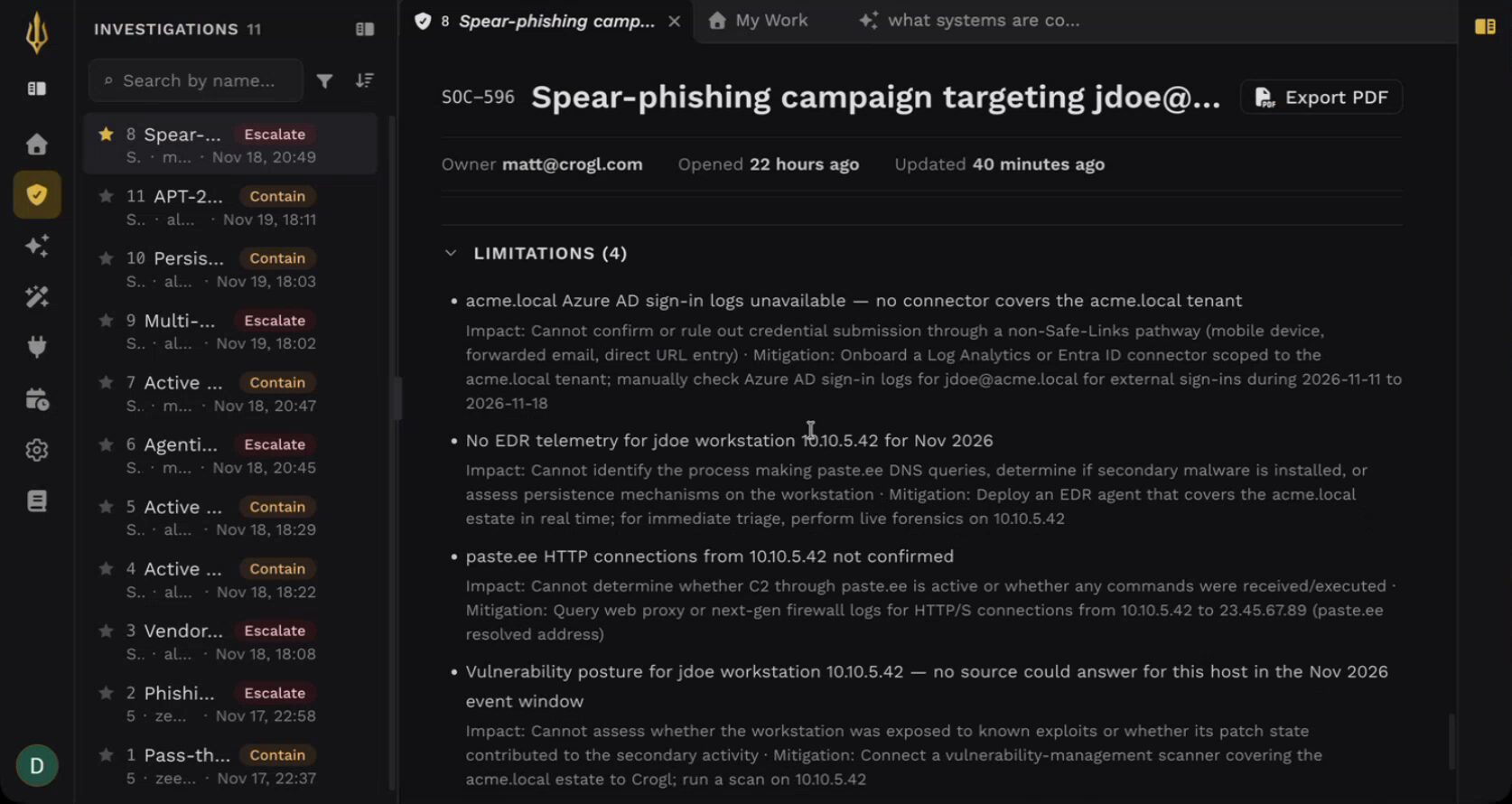
Crogl is very transparent. Each investigation report shows the full search trail behind its findings, and a limitations section admits where it may be missing context or data.
Those limitations set the report’s confidence score, so the analyst gets an accurate picture rather than incomplete advice. SOC leaders also get deep auditing into every query Crogl runs and what investigations are taking place, which is important from a compliance perspective.
Pricing
Pricing is straightforward: Crogl charges a flat price per team rather than per alert or investigation, and there is a single-user edition which is completely free.
Crogl doesn’t publish prices for its Enterprise edition. It sells Enterprise per team (or per queue) on an annual contract, with unlimited investigations. You bring your own LLM and pay your model provider directly for usage. Crogl argues that pricing by volume works against security teams, because it gives them a reason to investigate fewer alerts.
The free single-user edition is the same product. Requests need a work email and are reviewed by Crogl before access is granted. Multi-user access with SSO, role-based access control, automated triage, governed auto-remediation and dedicated support are part of Crogl Enterprise. Contact Crogl or one of its partners for a quote.
Strengths and Cautions
Strengths
- Runs on-premises, in a private cloud or fully air-gapped, with your own LLM
- Switch LLMs without losing environment context
- No data normalization or new pipeline
- Every report shows its searches, gaps and confidence score
- Headless mode writes full investigation reports back to Jira
- Flat per-team pricing with unlimited investigations
Cautions
- Built for organizations with 2,500 or more employees
- No published Enterprise pricing, and LLM costs are paid to your provider separately
Who It’s For
Crogl is best suited to larger teams, at organizations with 2,500 or more employees. It’s popular with critical infrastructure organizations such as utilities, oil and gas companies and government agencies, which need to keep their data and their AI within their own environment. Large enterprises in regulated sectors with the same requirements are also a good fit.
It suits SOC teams that want to pull together disparate streams of data from across their security tools without another data pipeline or normalization project, and teams that work from a ticket queue in Jira or ServiceNow and want each ticket investigated before an analyst opens it.
Crogl is a weaker fit for smaller teams, and for teams without a SOAR platform that want response actions automated, since Crogl’s automated response runs through existing SOAR playbooks and other actions need skills or code your team builds. Crogl sells through channel partners rather than direct, so most buyers will work with a systems integrator or MSSP.