Best 10 Phishing Awareness Training Solutions For Business (2026)
We reviewed 10 phishing awareness training platforms on simulation quality, content engagement, and the reporting that tells you which employees remain your highest risk. Click rates alone are not enough.
 Written by
Caitlin Harris
Written by
Caitlin Harris
 Technical Review by
Craig MacAlpine
Technical Review by
Craig MacAlpine

Phishing awareness training solutions combine simulated phishing attacks with educational content to build employee resilience against social engineering, measuring behavioral change over time rather than just module completion. Click rates without follow-up training do not reduce risk; the platforms that drive behavioral change are measurably different from those that track completion. We reviewed 10 platforms and found Phished, Adaptive Security, and ESET Cybersecurity Awareness Training to be the strongest on simulation realism and behavioral change reporting.
Phishing awareness training is where security culture either builds momentum or stalls completely. The difference between programs that change behavior and programs that waste time is execution quality. The wrong platform leaves employees checking boxes on mandatory training they’ll forget by next week. Choose well and employees catch threats before they land in inboxes.
We evaluated 10 phishing awareness training platforms for simulation quality, content depth, behavioral change evidence, reporting accuracy, and how they actually drive participation. What we found: most platforms look similar until you examine engagement rates and whether employees actually remember what they learned. Some excel at gamification and behavioral science. Others focus on compliance checkbox completion. The platforms that move the needle combine automated campaigns with follow-up training tied directly to simulation failures.
This guide cuts through the marketing to show you which platforms build genuinely phishing-resistant workforces versus those that just generate compliance reports.
What is Phishing Awareness Training?
Phishing awareness training teaches employees to spot and report phishing emails, malicious links, and social engineering attacks before they cause damage. Programs send simulated phishing emails to employees and track who clicks, who reports, and who enters credentials. Employees who fail simulations receive targeted training on the specific tactic they missed. The goal is to turn employees from a security liability into an active defense layer.
Phishing awareness training platforms operate across three layers: simulation engines, content delivery, and behavioral analytics. Simulation engines generate phishing emails using customizable templates that replicate real-world attack tactics including BEC, spear-phishing, credential harvesting, and increasingly deepfake audio and video. Content delivery systems assign micro-learning modules at the point of failure, connecting each simulation result to targeted education. Behavioral analytics aggregate click rates, reporting rates, credential submission rates, and time-to-report into individual and organizational risk scores. Advanced platforms use machine learning to personalize simulation difficulty based on each user's historical performance, adapting both frequency and sophistication over time. Integration with email security gateways, SOC triage tools, and identity providers enables closed-loop workflows where employee-reported phishing feeds directly into threat detection and inbox-level remediation across the organization.
Phishing Awareness Training Solutions Compared
This table compares the key capabilities across all 10 phishing awareness training platforms we reviewed.
| Product | Best For | Type | AI Content Generation | Adaptive Difficulty | Closed-Loop Remediation | Multi-Channel Simulation |
|---|---|---|---|---|---|---|
|
Phished
|
Low-admin automated phishing testing
|
Standalone
|
No
|
Yes
|
Yes
|
Yes
|
|
Adaptive Security
|
AI-powered threat simulation
|
AI-Native
|
Yes
|
No
|
No
|
Yes
|
|
ESET Cybersecurity Awareness Training
|
Gamified engagement
|
Standalone
|
No
|
No
|
Yes
|
No
|
|
IRONSCALES
|
AI-driven detection and training
|
Integrated
|
Yes
|
Yes
|
Yes
|
No
|
|
Hoxhunt
|
Adaptive training at enterprise scale
|
Standalone
|
Yes
|
Yes
|
Yes
|
Yes
|
|
Proofpoint Security Awareness Training
|
Proofpoint ecosystem customers
|
Standalone
|
No
|
No
|
Yes
|
Yes
|
|
Cofense PhishMe
|
Active threat response integration
|
Standalone
|
No
|
No
|
Yes
|
Yes
|
|
Infosec IQ
|
Structured year-long programs
|
Standalone
|
No
|
No
|
Yes
|
No
|
|
KnowBe4 Security Awareness Training
|
Proven enterprise-scale programs
|
Standalone
|
Yes
|
Yes
|
Yes
|
Yes
|
|
CyberSentriq Security Awareness Training
|
MSP multi-tenant management
|
Standalone
|
No
|
No
|
Yes
|
Yes
|
How We Tested
We evaluated 10 phishing awareness training platforms across simulation design, content library depth, behavioral change evidence, reporting accuracy, and whether they actually drive employee participation. This article was researched and written by Caitlin Harris and technically reviewed by Craig MacAlpine, CEO and Founder of Expert Insights. Our editorial and commercial teams operate independently; no vendor can pay to influence our reviews. Read our full methodology

Phished is a phishing simulation platform built around autonomous campaign scheduling and machine learning-driven personalization. The platform learns which phishing emails individual users are likely to click on and tailors simulations to each person’s unique patterns, which is a meaningful differentiator from platforms that send the same template to everyone. We think it’s a strong option for organizations that want effective, ongoing phishing testing with minimal admin overhead.
- Auto-generates simulation content and schedules campaigns on a custom cadence; the platform recommends every 15 days.
- Simulations cover BEC, insider threats, and spear-phishing, with an option to disable spear-phishing campaigns if needed.
- Users report suspected phishing via a button in their Microsoft 365 client or by forwarding the email when using other clients; correct reports are congratulated, failures trigger training at the point of failure.
- Phished Academy delivers bite-sized micro-learning modules with articles and limited video content; admins can create quizzes to test users.
- Reporting covers individual users and departments, including training completion, email reporting, simulation clicks, and credential submissions.
We were impressed by how much Phished delivers with how little ongoing effort. Configuring an automated campaign takes minutes, and once set up, simulations run on schedule without extra work. The personalization is the real strength; because every user receives simulations based on their own click history, testing is more accurate and realistic than platforms using a one-size-fits-all approach. Something to be aware of is that the Phished Academy doesn’t provide an extensive amount of training content, so if you need a full-spectrum awareness training library, you may need to supplement it. Simulation templates and training are available in nine languages, though Spanish content is limited and the most material is available in Dutch and English.
Strengths
Cautions

Adaptive Security
Best for AI-powered threat simulation
Adaptive Security is an AI-native simulation platform focused on the social engineering threats that traditional awareness tools overlook: deepfake audio, video, voice, and text-based phishing. Backed by $136 million in total funding from investors including the OpenAI Startup Fund, Andreessen Horowitz, and Bain Capital Ventures, it’s one of the fastest-moving vendors in this space. We think it’s the right call if AI-generated threats are already on your risk register.
- Generative AI builds simulations that go beyond standard phishing emails, including audio deepfake simulations that create realistic impersonations of employees.
- GenAI content builder constructs custom modules from scratch, tailored to your industry and employee risk profiles.
- Automated enrollment and reminders run through Slack and email.
- DMI-based Outlook integration avoids false positives caused by email gateway link scanning.
- Covers voice phishing, SMS attacks, video deepfakes, and standard email scenarios from a single platform.
Customers consistently highlight fast deployment, with M365 and Google Workspace connections coming together in days rather than weeks. Support is responsive and ships frequent updates that keep simulation content current with evolving threats. Something to be aware of is that some users note reporting exports lack the flexibility needed for executive stakeholder presentations, and international functionality is limited for some non-US office locations.
We were impressed by the depth of the deepfake simulation capabilities. Adaptive moves faster than most vendors in this category, and the customization depth is real. If your organization is already thinking about AI-powered social engineering threats, this platform addresses them more directly than any other option we reviewed.
Strengths
Cautions


ESET
Best for gamified engagement in regulated environments
ESET Cybersecurity Awareness Training combines gamified learning modules with phishing simulation tools designed for organizations that need engaging awareness training alongside realistic testing. We were impressed by the gamification approach, which drives better completion rates than most platforms we reviewed.
- Phishing simulation library provides prebuilt templates that admins can customize and deploy to specific users or groups, with no limits on simulation volume.
- Users who fail a simulation are automatically enrolled in refresher training, closing the loop between testing and education.
- RPG-style role-playing scenarios, interactive quizzes, and context-driven sessions explain the consequences of poor security decisions.
- Reputation scoring tracks each user’s progress; leaderboards encourage improvement across individuals and departments.
- Office 365 plugin enables suspicious email reporting directly from the inbox; supports HIPAA, PCI DSS, SOX, NIST, GDPR, and CCPA compliance.
We were impressed by the auto-enrollment feature that routes simulation failures directly into remedial training. That connection between testing and education is where real behavior change happens. The gamified content is designed to be accessible to all skill levels, and modules are short and focused to prevent fatigue. Setup is fast; employee emails import via CSV and simulations deploy within a few clicks. Pricing starts at $250 for 10 users on the premium plan, with a free plan covering approximately 60 minutes of training. With that said, the platform does not support multiple languages. If you’re in a regulated industry that needs both phishing simulation and compliance-aligned training, ESET is well worth considering.
Strengths
Cautions

IRONSCALES is an API-based email security and security awareness training platform that sits at the mailbox level inside Microsoft 365 or Google Workspace. It provides inbound email protection against advanced email threats, spam, phishing attacks, and business email compromise, as well as a comprehensive phishing simulation and awareness training platform. This includes adaptive phishing simulations that use AI to mirror real-world attacks, and high-quality training content via partnerships with security awareness training content providers like Ninjio.
- Phishing report button built directly into the email client creates a unified workflow where simulations and real threats are indistinguishable to the end user, reinforcing good reporting habits.
- Hyper-personalized phishing simulation campaigns tailored to each employee’s role, communication patterns, and risk profile using data from 17,000 email environments.
- Themis virtual SOC conducts investigation and remediation autonomously, providing admins context on email threats.
- Employees can report suspicious emails with a single click, feeding reports back into detection across the entire IRONSCALES customer base of over 17,000 organizations.
- Machine learning, AV engines, and URL scanning provide protection against malicious links and attachments; dynamic warning banners flag suspected email content.
We are impressed by IRONSCALES. The phishing simulations are highly realistic and can be customized to mimic the attacks actually facing your organization. Reporting is detailed and makes it easy to track overall business performance. The training content itself is engaging and high-quality. The agentic AI capabilities, particularly the predictive red team agent, put IRONSCALES at the leading edge of proactive threat modeling in the email security space. IRONSCALES is best suited for teams looking for a dedicated email security tool with built-in phishing awareness training and realistic simulation campaigns.
Strengths
Cautions
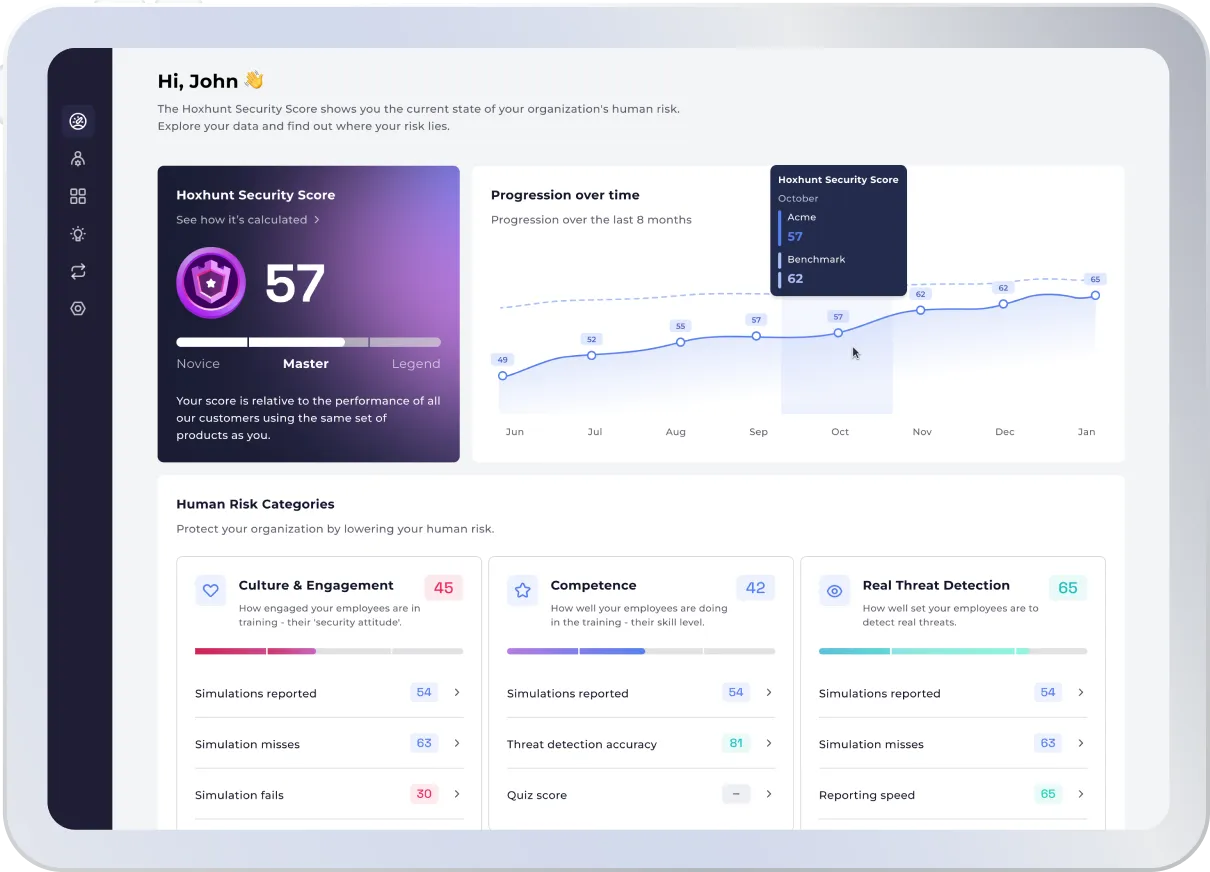

Hoxhunt is a security awareness platform that uses AI-driven personalization and gamification to train employees on phishing detection and reporting. We think it’s a strong fit for global enterprises that need phishing awareness training to land across diverse, multilingual workforces. The platform adapts simulation difficulty to each user’s skill level and supports over 30 languages.
- Personalizes phishing simulations based on each user’s skill level, department, and location; as users improve, simulations get harder.
- Progressive difficulty model keeps experienced users challenged rather than coasting through exercises they’ve already mastered.
- Real-time feedback on reported emails reduces SOC workload by automating phishing analysis on the backend.
- Reward system drives sustained engagement beyond initial onboarding.
- Supports 30+ languages for consistent global training programs.
We were impressed by the adaptive difficulty model, which is more than a checkbox exercise. The SOC integration and 30-plus language support make Hoxhunt well suited to enterprise teams running awareness programs across multiple regions from a single console. If you need training that scales with user sophistication, it’s well worth considering.
Strengths
Cautions
Proofpoint Security Awareness Training

Proofpoint
Best for Proofpoint ecosystem customers
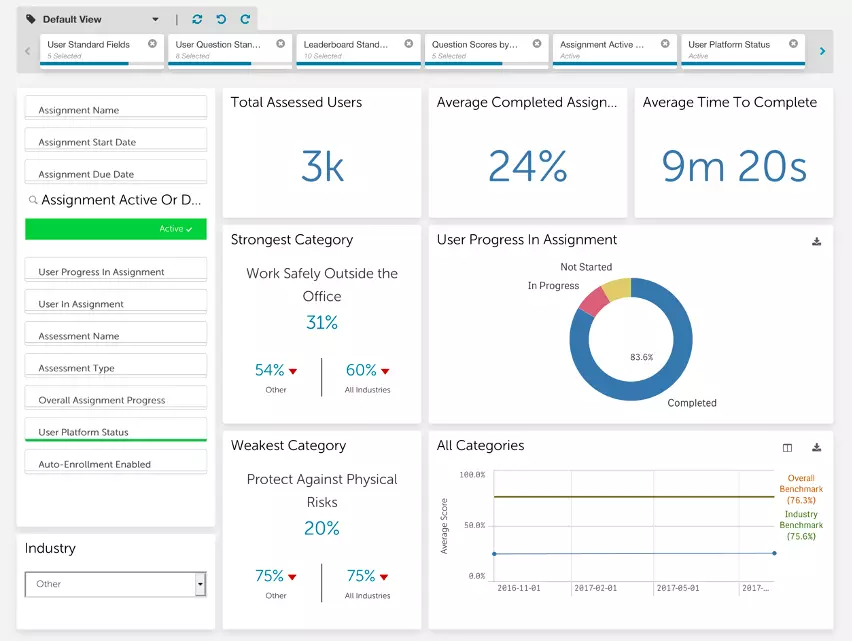
Proofpoint Security Awareness Training (formerly Wombat Security) extends the Proofpoint email security ecosystem with phishing simulations, training content, and employee reporting tools. We think it makes the most sense if your organization already runs Proofpoint for email security. The integration depth and shared threat intelligence are real advantages that standalone tools can’t replicate.
- Phishing simulation template library covers phishing, smishing, and USB-based attack scenarios with enough variety for meaningful monthly campaigns.
- Converts real-world neutralized phishing attempts into live simulation material, which is sharper than generic templates.
- Over 600 learning modules available on demand in multiple formats including videos, posters, infographics, and articles, each designed for approximately 15 minutes.
- PhishAlarm reporting button integrates with Proofpoint’s heuristic scanning pipeline, protecting against new unknown threats.
- Available as part of Proofpoint’s Essentials package alongside their broader email security stack.
Customers running regular phishing campaigns highlight the ease of monthly campaign management, with dedicated account managers helping teams select and schedule appropriate templates. The customer support responsiveness draws consistent positive feedback across team sizes. Something to be aware of is that some customer reviews mention sender email customization is limited, which can reduce simulation authenticity.
We were impressed by the template library depth and the ability to convert real neutralized threats into simulation content. For enterprise teams where Proofpoint is already the email security standard, this extends that investment into employee behavior effectively. MSPs or organizations evaluating it outside the Proofpoint ecosystem will find the per-tenant pricing harder to justify.
Strengths
Cautions
Cofense PhishMe


Cofense
Best for active threat response integration
Cofense PhishMe goes beyond standard phishing simulation by connecting employee reporting directly to active threat response. We think it’s the right call if you want awareness training connected to real incident response rather than running as a standalone program. Gartner has recognized Cofense as a leader in security awareness and computer-based training. The Reporter-to-Triage-to-Vision pipeline is genuinely differentiated from platforms that only simulate threats.
- Reporter button lets employees flag suspicious emails with one click in Outlook, Gmail, or IBM Notes, feeding directly into Cofense Triage for analysis.
- Cofense Vision enables security teams to search for and quarantine malicious emails from all user inboxes after a report.
- Closed-loop approach means an employee reporting a live phishing attempt triggers remediation across every inbox the same email landed in.
- Cofense Triage combines human and AI analysis to distinguish genuine threats from false alarms reported via the button.
- Machine learning trained on reported threats improves detection over time; simulations are fully customizable to target specific threats.
Customers highlight the Reporter button as the feature that gets used most consistently, with minimal friction for end users. The simulation customization and reporting analytics draw positive feedback from security teams tracking program progress over time. Something to be aware of is that some customer reviews note the platform requires continuous maintenance and dedicated staff to administer effectively, and repetitive simulations can cause user fatigue over extended deployments.
We were impressed by the closed-loop connection between employee reporting and active remediation. This is a platform built for organizations that want employees to be active defenders, not just training participants. If your detection strategy includes employee reporting as a core component, Cofense PhishMe is well worth considering.
Strengths
Cautions
Infosec IQ


Infosec (Cengage Group)
Best for structured year-long awareness programs
Infosec IQ provides security awareness training with a broad content catalog covering phishing, ransomware, and social engineering through interactive videos and quizzes. Now part of the Cengage Group, the platform supports deep customization, including uploading organization-specific training materials. We think it’s best suited for organizations building structured, year-long awareness programs. 70% of the Fortune 500 partner with Infosec.
- Delivered as a 12-month program; IQ PhishSim lets security teams build customized phishing campaigns from an expansive template library with new templates added weekly.
- Auto-enrollment on relevant training modules when an employee clicks a simulated phishing link, delivering learning immediately after the mistake.
- Training catalog includes over 3,000 awareness and training resources, with content in 34+ languages and over 300 international phishing templates.
- PhishNotify Outlook plugin lets employees flag suspicious emails on any device, with reported threats automatically prioritized by threat level.
- Admins can upload organization-specific materials for compliance or sector-specific requirements.
Customers consistently highlight the depth of training options and the quality of account support, with dedicated contacts making a noticeable difference in how teams extract value from the platform. The Office 365 setup process draws positive feedback for being straightforward, and the content library earns praise for avoiding the AI-generated feel that makes employees tune out. Something to be aware of is that some customer reviews mention the reporting and campaign sections have a steep initial learning curve.
We were impressed by the content depth and the structured 12-month program model. The customization options support mature programs well, and the dedicated account support model makes a real difference. If you need a structured program with consistent content delivery rather than a lightweight simulation tool, Infosec IQ is well worth considering.
Strengths
Cautions
KnowBe4 Security Awareness Training


KnowBe4
Best for proven enterprise-scale awareness programs
KnowBe4 is the largest security awareness training and simulated phishing platform on the market, a market leader in both revenue and customer count. We think it’s the low-risk choice for organizations that want a proven, well-supported awareness program with the content variety to sustain long-term engagement. The platform combines an extensive multilingual content library with organizational risk scoring, automated phishing campaigns, and a dedicated customer success model.
- Training library covers videos, interactive modules, games, and quizzes across 35 languages, including role-specific tracks for management and system administrators.
- Free baseline simulated phishing attack available before purchasing the full platform.
- PhishAlert button integrates with Outlook, Exchange, Microsoft 365, and Google Workspace for one-click suspicious email reporting; tracks which employees report simulated phishing emails.
- Organizational risk score aggregates individual phishing simulation results into a single metric for targeting campaigns.
- AIDA system within the Diamond tier automates training assignments and generates custom phishing templates based on individual user risk scores.
Customers say the training content is current and relevant, with interactive modules that hold attention across technical and non-technical staff alike. The constantly updated content library and dedicated success managers who stay engaged beyond onboarding draw consistent praise. The organizational risk score gives security teams a clear metric to track program effectiveness over time. Something to be aware of is that some users note campaign setup is time-consuming, with no managed service option to reduce the administrative workload.
We were impressed by the organizational risk scoring and the CSM support model, which reduces internal program management overhead. On average, KnowBe4 reduces an organization’s phish-prone percentage from 30% to less than 5% after 12 months, which is a strong data point. Organizations looking for lightweight setup or advanced AI-driven simulation will find other platforms better suited, but if you want a mature platform with a track record, KnowBe4 earns its market position.
Strengths
Cautions
CyberSentriq Security Awareness Training


CyberSentriq
Best for MSP multi-tenant management
CyberSentriq Security Awareness Training is built for MSPs and larger enterprises managing cybersecurity training across multiple client environments. We think it makes the most sense if you’re an MSP standardizing security awareness training across a client base. The platform combines automated phishing simulations, real-time awareness training, and a single management portal designed for multi-tenant operations.
- Just-in-time training delivers a relevant training module immediately when a user engages in risky behavior, connecting the lesson directly to the action.
- SCORM integration gives MSPs flexibility to upload custom materials alongside built-in video and quiz content.
- Single management portal handles campaigns, users, and reporting across all client tenants.
- Training modules run about 8 to 10 minutes each; the content library is updated weekly.
- Automated scheduling and campaign management reduce ongoing admin overhead per client.
Customers running MSP operations consistently highlight the low ongoing admin overhead. Once campaigns are configured and scheduled, the platform handles automation without requiring constant attention. Multi-tenant management through a single portal saves significant time across client environments.
We were impressed by how well CyberSentriq fits the MSP model. The automated scheduling, multi-tenant portal, and just-in-time training combine to deliver strong coverage with minimal ongoing effort per client. Organizations running a single internal program will find the value proposition less obvious, but if your team manages training for multiple organizations, the operational efficiency is hard to beat at this price point.
Strengths
Cautions
Other Security Awareness Training Services
Beyond our top 10, these phishing awareness training platforms are also worth considering.
Delivers automated security training based on real phishing attacks.
Offers a comprehensive platform for simulating phishing attacks and providing security awareness training.
Delivers engaging, Hollywood-style micro-learning videos to educate employees about security threats.
Provides security awareness training and phishing simulations as part of its broader cybersecurity education offerings.
Empowers employees to identify and prevent threats with managed phishing campaigns and training.
Security Awareness Training Pricing
Pricing for phishing awareness training varies by vendor, organization size, and contract terms. Many platforms are quote-based, particularly at enterprise scale. The table below reflects publicly available starting prices where we could verify them; contact vendors directly for tailored quotes.
| Product | Starting Price | Billing | Link |
|---|---|---|---|
|
Phished
|
Contact for quote
|
Annual
|
|
|
Adaptive Security
|
Contact for quote
|
Annual
|
|
|
ESET Cybersecurity Awareness Training
|
$250/10 users (Premium); free plan available
|
Annual
|
|
|
IRONSCALES
|
From $3.89/user/month (Protect tier)
|
Annual
|
|
|
Hoxhunt
|
Contact for quote
|
Annual
|
|
|
Proofpoint Security Awareness Training
|
Contact for quote
|
Annual
|
|
|
Cofense PhishMe
|
From $10/user/year
|
Annual
|
|
|
Infosec IQ
|
From $15/user/year (100-499 learners)
|
Annual
|
|
|
KnowBe4 Security Awareness Training
|
From $1.30/user/month (Silver tier)
|
Annual
|
|
|
CyberSentriq Security Awareness Training
|
Contact for quote
|
Annual
|
|
Security Awareness Training Checklist
These are the configuration and operational steps we recommend when deploying a phishing awareness training platform.
Measuring your organization's current click rate gives you a starting benchmark to track improvement against.
Infrequent simulations let employees forget what they learned; regular testing keeps phishing awareness active.
Training delivered at the point of failure is more effective than generic modules assigned weeks later.
Generic templates are easier to spot; simulations that mimic real vendor emails or internal communications test awareness more accurately.
Making it easy to report suspicious emails builds a reporting culture and feeds real threat data back into your security operations.
Click rates show who falls for simulations; reporting rates show who is actively defending the organization.
Connecting employee-reported phishing to your threat detection pipeline turns awareness training into an active defense layer.
High-risk users who repeatedly click simulations need more frequent, focused training than those who consistently report threats.
Email-only simulations leave gaps if your users are also targeted through phone calls or text messages.
Demonstrating reduced click rates and increased reporting rates builds organizational support for ongoing investment.
The Bottom Line
Phishing awareness training separates organizations that catch attacks before they land from those that treat it as a compliance checkbox. KnowBe4 remains the most proven choice for mid-market teams that want extensive content, organizational risk scoring, and strong CSM support. Hoxhunt stands out for global enterprises needing multi-language support and adaptive difficulty that keeps all users challenged. Proofpoint Security Awareness Training is the clear winner if you already run Proofpoint email security; the integration depth and template library are unmatched. Phished fits organizations that want low-admin automation and behavioral risk scoring without complex setup. Adaptive Security earns consideration for teams already managing AI-powered threat simulations. ESET Cybersecurity Awareness Training works for regulated environments where audit trails matter. CyberSentriq Security Awareness Training serves MSPs well with multi-tenant capabilities and just-in-time training. IRONSCALES consolidates email security and training for small teams. Cofense PhishMe connects training directly to active threat response when employee reporting is part of your detection strategy. Infosec IQ suits organizations building year-long structured programs. Choose based on whether you prioritize behavior change, compliance documentation, content variety, or integration depth.
Phishing Awareness Training Solutions: Everything You Need To Know (FAQs)
Traditionally, phishing emails targeted hundreds or even thousands of recipients at a time. They were designed to trick users into clicking on a URL that would lead to a webpage where they’d be asked to enter personal information. While these types of phishing attack still exist, cybercriminals have adapted their attacks, making malicious phishing messages harder for machines and humans to identify. These more targeted attacks are called “spear phishing”.
Here the attacker impersonates a trustworthy sender and aims to trick their victim into handing over sensitive information (such as account credentials or financial data). Alternatively, the user may be encouraged to click on a malicious link or file that will install malware on their device.
Both spear and regular phishing attacks have key indicators that users can look out for to determine whether an email is genuine or fraudulent.
While spear and regular phishing attacks sent via email are the most common type, there are a few other variants to look out for:
- Vishing (Voice phishing) uses voice calls to trick users; these can be very convincing as the attackers can put pressure on their users in real-time to create a sense of urgency
- SMiShing is the same as phishing, except that the attacker sends their target an SMS text instead of an email
- Whaling targets high ranking, often C-level, members of an organization; these attacks take more effort on the attacker’s part, but the payoff can be much greater
Phishing awareness training teaches users how to spot and react to different types of phishing attacks. As phishing attacks are constantly evolving and phishing risk increases, giving your users a list of phishing emails to avoid won’t be enough to block online attacks. Instead, you need to train them to be vigilant and naturally suspicious of emails that encourage them to act or share details. Phishing awareness training can help you create a culture of security that will encourage this cautious behavior.
Phishing awareness training solutions use content-based training (such as bite-sized videos, infographics, and quizzes) to explain common indicators of compromise (IOCs) and train users on what to look for. This means that when a user encounters a new attack type, they already have the skillset to identify a dangerous message and act accordingly.
Anti-phishing training also teaches users how much damage a successful phishing attack can cause. Without this, it can be hard to understand the significance of something as simple as clicking on a link. When users know what’s at risk, they are more likely to act cautiously.
The best phishing email training solutions also enable you to test your users’ response to a phishing attack by sending them simulations if they experience a failure in a test.
Phishing simulators, or simulations, are fake phishing emails that security teams send to their employees to test how they would react to a real-life phishing attack. They’re usually included in a wider phishing awareness training program that also teaches users (via content-based training) how to identify a threat.
Accurate simulations enable users to apply the knowledge that they’ve gained whilst completing their anti-phishing training course. They also enable admins to identify any users that may be particularly susceptible to phishing attacks and assign those users further training.
Phishing simulation training usually focuses on email phishing and enables IT teams to either choose from a library of out-of-the-box templates or create their own emails that can be tailored to their users and use-case. Some simulators also enable IT teams to carry out SMiShing attacks, but this often comes at an extra cost.
A good phishing awareness program and relevant training is critical for any organization, no matter how big or small you are or what sector you’re operating within. There are four key reasons why we recommend that you train your users on how to behave in response to phishing attacks:
- Reduce your risk of being breached. Social engineering attacks such as phishing are the most likely type of threatto cause a data breach. If you train your users to identify threats, they’ll be less likely to engage with them.
- Identify areas for improvement. Some individuals might require more training than others—either because they find it more difficult to identify phishing attacks, or because they’re working in an area of the business that handles particularly sensitive information, which means they’re more likely to be targeted. With a phishing awareness training solution, you can monitor how users are reacting to simulations and tailor training programs to suit each individual’s needs.
- Ensure compliance with data protection standards. Security awareness training, including phishing awareness training, is a mandatory requirement of many industry and federal compliance standards, such as GDPR, HIPAA, and PCI-DSS.
- Create a culture of security. Investing in the right phishing awareness training program can show your users you want to help and support them, rather than punish them when they make mistakes. This can help you build a stronger relationship with them, so they’re more likely to come and tell you if they do receive or click on a phishing email, rather than panic and try to cover it up.
Phishing awareness training cultivates a security-first mindset that prioritizes data protection and network security, effewctively supporting human risk management. It does this by providing employees with the knowledge and tools they need to combat phishing attacks. Carefully designed programs teach users how to detect and react to threats so that they can help protect sensitive data, rather than being considered an easy way into an organization’s network.
It’s thanks to powerful training and simulation solutions that recent years have seen a decrease in phishing click rates and an increase in reporting rates, despite the volume of phishing attacks increasing year on year.
There are a number of different phishing awareness training solutions out there, and it can be difficult to know which one is best suited to your needs. The most effective solutions include the following features, so keeping an eye out for these is a good place to start:
- A multi-media content library that’s regularly updated. Note the emphasis on “multi-media”! Your employees will all have individual learning styles, so a variety of materials will make sure that the material is engaging for everyone. And when the library is regularly updated, you can be sure that it will contain information on the newest threats that organizations are facing.
- Customization. It’s important that you can build learning paths or tailor modules to target specific threats that your organization is facing. It’s also important that simulated phishing emails designed to test employees can be customized to mimic the types of emails your employees typically receive.
- Interactivity. Quizzes, tests and gamification are sure-fire ways to increase user engagement which, in turn, increases information retention. This means that your employees will remember what they’ve learned and be much more likely to put it into practice.
- Simulations. You need to be able to test what your employees have learned, and the best way to do this is through simulated phishing emails. Users should report these emails, either through the solution’s inbuilt reporting button (see below) or by contacting their IT desk, but if they don’t, they’ll be directed to a landing page that explains their mistake.
- A “Report Phishing” button. These inbox plugins allow users to report not only simulated phishing emails, but also genuine threats, to their IT department. They’re a quick and easy way to flag suspicious content. The best simulations go a step further, with automated analysis based on reported phishing attempts, and triaging of reported emails. Agari’s 2020 Phishing Incident Response Survey found that 67% of all reported incidents were false positives, i.e. not real threats at all. Automated analysis saves security teams valuable time by separating false positives from genuine threats, then prioritizing these threats.
- Admin reporting tools. The best simulation solutions include admin reporting so that you can see who is falling for simulated threats. This means that you can direct those employees towards specific training materials, and re-test them in future simulations.
Security Awareness Training Resources
Further reading on security awareness training from Expert Insights — buyers' guides, comparison articles, and platform-specific shortlists.


 Written By
Caitlin Harris is the Head of Content at Expert Insights. As an experienced content writer and editor, Caitlin helps cybersecurity leaders to cut through the noise in the cybersecurity space with expert analysis and insightful recommendations.
Prior to Expert Insights, Caitlin worked at QA Ltd, where she produced award-winning technical training materials, and she has also produced journalistic content over the course of her career.
Caitlin has 8 years of experience in the cybersecurity and technology space, helping technical teams, CISOs, and security professionals find clarity on complex, mission critical topics like security awareness training, backup and recovery, and endpoint protection.
Caitlin also hosts the Expert Insights Podcast and co-writes the weekly newsletter, Cyber Weekly.
 Technical Review
Craig MacAlpine is CEO and Founder of Expert Insights. Before founding Expert Insights in August 2018, Craig spent 10 years as CEO of EPA Cloud, an email security provider that rebranded as VIPRE Email Security following its acquisition by Ziff Davis, formerly J2Global (NASDAQ: ZD) in 2013.
Craig is a passionate security innovator with over 20 years of experience helping organizations to stay secure with cutting-edge information security and cybersecurity solutions.
Using his extensive experience in the email security industry, he founded Expert Insights with the singular goal of helping IT professionals and CISOs to cut through the noise and find the right cybersecurity solutions they need to protect their organizations.